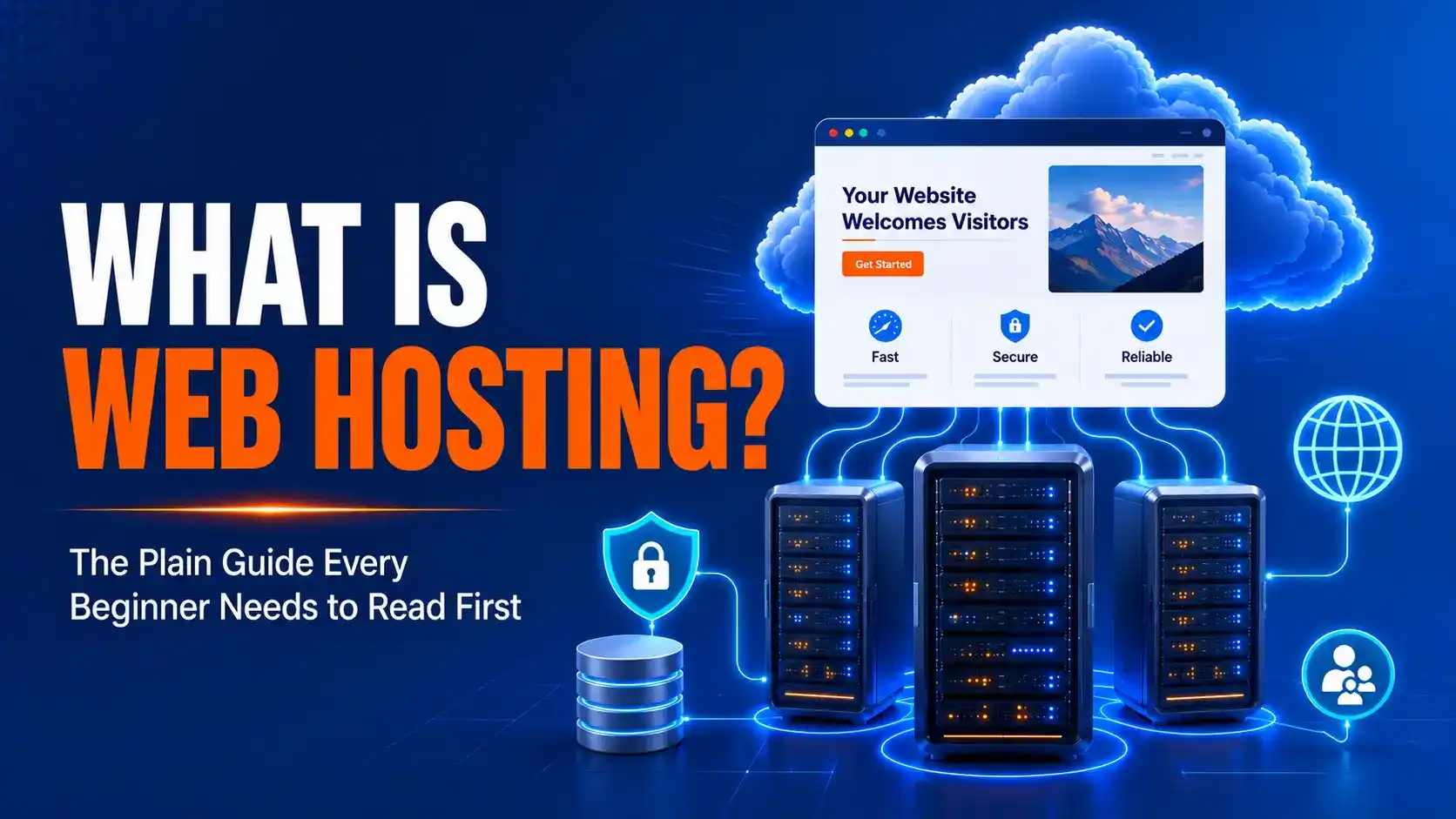
What is web hosting in 2026?: the best plain- guide every beginner needs to read first
Disclosure: Some links on this page are affiliate links. We may earn a commission at no additional cost to you.
Last tested/updated: June 2026
Introduction
What is Web Hosting in 2026? If you’ve recently bought a domain name, you might expect your website to appear online immediately. But after typing your domain into a browser and pressing Enter, you’re often greeted by a blank page, a “This site can’t be reached” error, or a generic parking page that has nothing to do with your brand.
This is usually the moment when people realize that owning a domain name and having a live website are two completely different things. It’s also when they start asking the question: what is web hosting, and why do I need it?
The good news is that web hosting is much easier to understand than it sounds. You don’t need any technical skills or IT experience to grasp the basics. Spend the next 15 minutes with this guide, and you’ll learn exactly how web hosting works, why it’s essential for every website, what type of hosting you should choose, and which common mistakes to avoid as a beginner.
What you’ll need before you start?
Here’s genuinely all it takes:
- A domain name, either bought already or picked out (most hosts let you register one at checkout).
- 15 to 20 minutes, that’s the real time cost of understanding this, not just skimming it.
- An email address,your host uses it for setup and renewal notices.
- A card or PayPal account, only needed once you’re ready to buy, not just to read this.
That’s it. What is web hosting for beginners really comes down to renting space on someone else’s computer so your site stays online 24/7, instead of running it off your own laptop. No coding needed to grasp the idea, even if you’ll eventually brush up against a little of it.
Step 1: see what actually happens when someone visits your site
Every website is really just a set of files, HTML, images, code — sitting on a physical computer called a server. That server stays on, stays connected, and answers requests around the clock.
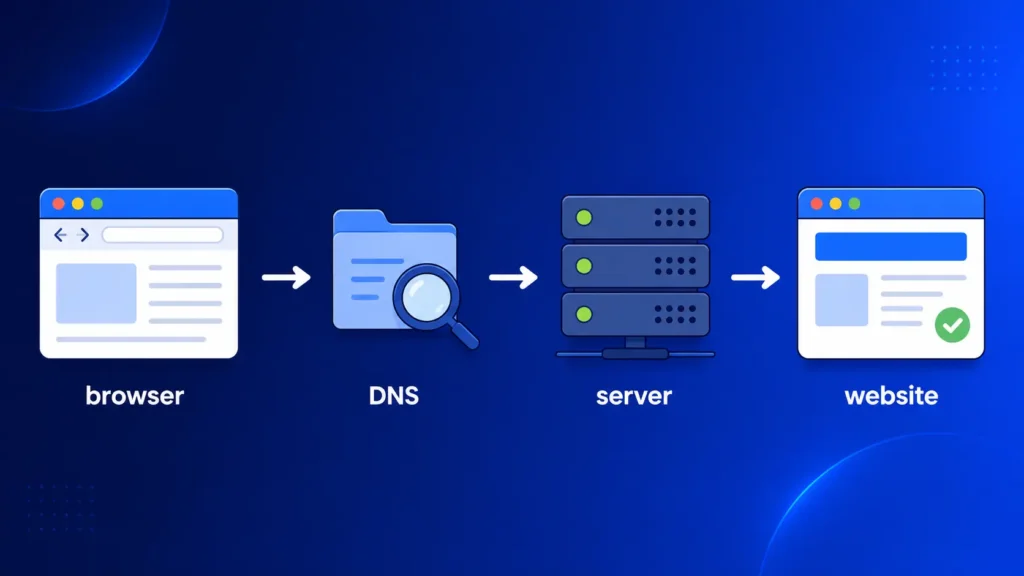
When someone types your domain into their browser, here’s the chain of events: the browser asks a DNS server “where does this domain actually live?”, gets back an IP address, then sends a request straight to your hosting server. The server grabs your files and sends the page back. All of that happens in under a second on a decent host, most people never think about it, which is sort of the point.
Most of the internet runs on a handful of server programs. Nginx powers roughly 32% of websites today, with Apache close behind at around 23%, according to W3Techs’ web server market share data. You don’t need to memorize that number. You just need to know your host picks one of these for you it’s part of what you’re paying for.
Step 2: separate your domain from your hosting account
This is the part that trips up almost everyone the first time, and honestly, it tripped me up too. Your domain name is the address something like hostchoices.com. Your hosting account is the building that address points to.
You can buy both from the same company, or from two totally different ones. I’ve done it both ways, and keeping them separate actually saved me once, when a registrar had a billing glitch and my site stayed online without a hiccup because the hosting side wasn’t affected at all.
If you want a clear, beginner-friendly breakdown of how domain registration actually works, ICANN’s beginner’s guides cover that side in plain terms worth a look as a companion to this guide, not a replacement for it.
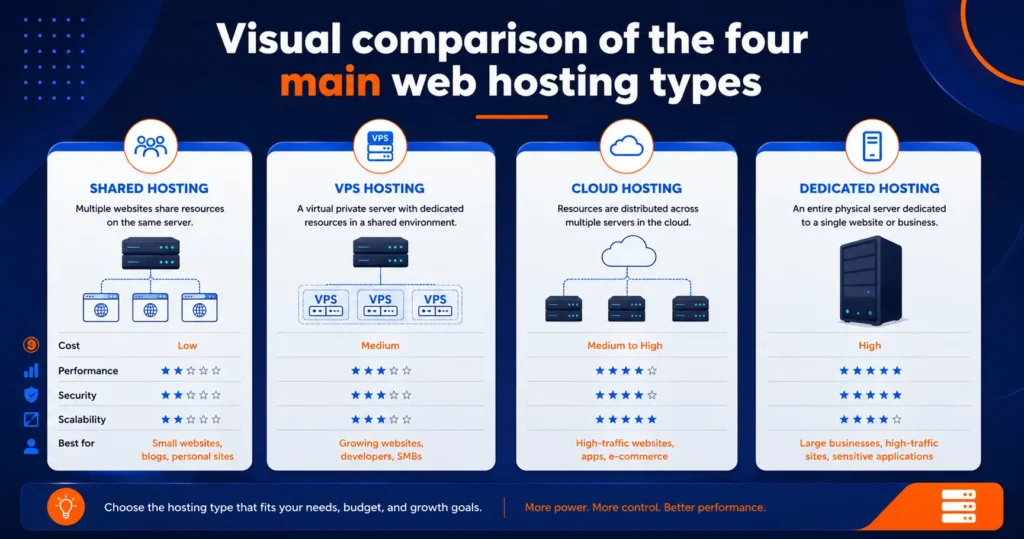
Step 3: learn the four main hosting types
You don’t need to master all four types today, but you do need to recognize the names before you buy.
Type | What it actually means | Good for |
Shared hosting | You share one server’s resources with other sites | Brand-new sites, blogs, small business pages |
VPS hosting | You get a private slice of a server, walled off from others | Growing sites with steady traffic |
Cloud hosting | Your site spreads across multiple servers automatically | Sites with unpredictable traffic spikes |
Dedicated hosting | An entire physical server is yours alone | Large stores, high-traffic apps |
If you’re just starting out, shared hosting is almost always the right call. It’s the cheapest, the simplest, and let’s be honest anything more is overkill protection for a 10-page site. For the full decision logic on matching a type to your actual traffic and budget, our how to choose web hosting guide walks through it step by step.
Step 4: check what’s actually included in a beginner plan
Walking through what is web hosting in 2026 step by step really means checking these line items before you buy, not after you’re already locked into a contract.
- Storage, how much space for your files (most beginner sites use under 2GB).
- Bandwidth, how much monthly traffic the plan allows.
- Free SSL certificate, that little padlock icon that encrypts visitor data. Most reputable hosts now bundle this through Let’s Encrypt, a free, widely trusted certificate provider, so you shouldn’t be paying extra for basic encryption in 2026.
- Email accounts, whether you get name@yourdomain.com addresses included.
- Control panel, usually cPanel or a custom dashboard for managing your account.
If you’re weighing a specific provider, you can see Bluehost pricing in detail to compare what’s bundled in versus what costs extra. That comparison alone saved you from an upsell on your first account.
Step 5: decide how much hosting you actually need
Here’s the thing, most beginners overbuy. A simple portfolio or local business site doesn’t need a dedicated server, and it rarely needs VPS hosting in year one either.
Start with shared hosting on a beginner plan. A typical beginner shared plan runs somewhere in the $2 to $10 a month range once you factor in an introductory rate, though renewal pricing is almost always higher (more on that below). If you outgrow it, moving up to VPS later is usually a straightforward upgrade, not a full rebuild.
Want to skip ahead? You can check Bluehost’s current plans while you finish reading, the link’s right there whenever you’re ready.
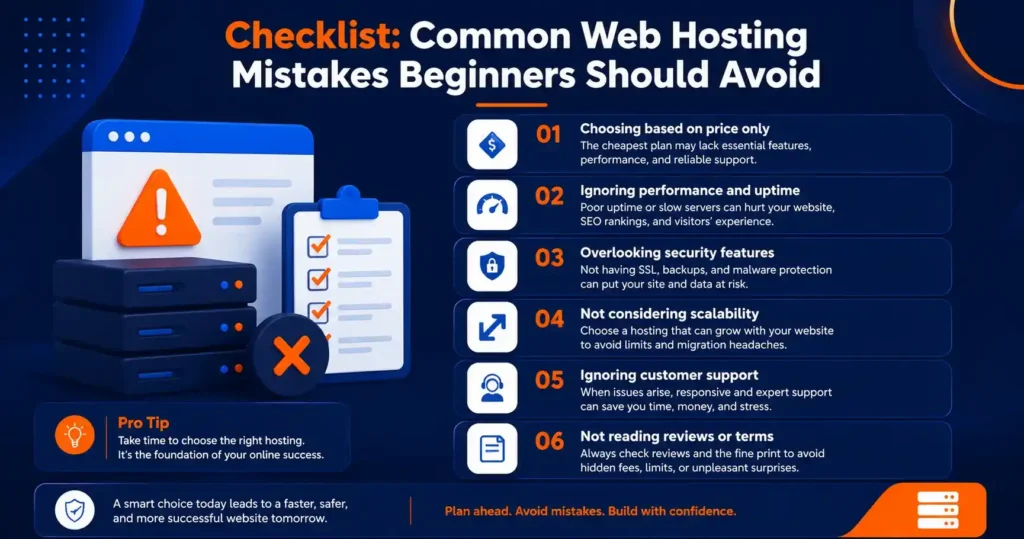
Common errors and how to fix them
What is Web Hosting in 2026? Essential Hosting Mistakes to Avoid Before Launching Your Website
Error 1: confusing the domain bill with the hosting bill. These are often two separate charges on two separate dates, even when bought from the same company. Fix: write both renewal dates in your calendar the day you buy.
Error 2: buying way more hosting than the site needs. A 12-page brochure site doesn’t need a dedicated server. Fix: start on shared hosting and only upgrade once your traffic data actually justifies it.
Error 3: ignoring the renewal price jump. Hosts advertise a low introductory price, then renew you at the standard rate — sometimes two to three times higher. Fix: read the renewal price on the pricing page before checkout, not after the first bill lands.
Error 4: assuming backups are automatic and free forever. Some plans include them, some charge extra, some only keep them for a few days. Fix: confirm backup frequency and retention in the plan details before you rely on it.
Pro tips for choosing hosting
Tip 1: run your future site’s homepage through Google’s PageSpeed Insights once it’s live, not before you’ve paid. It’s the fastest way to tell whether slow loading is a hosting problem or a design problem.
Tip 2: test live chat support before you buy, not after something breaks. Ask a real question and time the response. Anything over five minutes during business hours is a yellow flag.
Tip 3: set a calendar reminder 30 days before your renewal date. That’s enough time to compare current pricing against whatever you’re about to be charged automatically.
When this doesn’t work, what to do next?
If you’ve read all of this and you’re still not sure which provider fits your situation — that’s normal. This guide explains the concept, not every provider’s fine print.
That’s exactly the gap our see our top web hosting picks roundup is built to close. We’ve tested 8 providers head-to-head on real sign-up accounts, not press kits, and ranked them by what actually held up.
In practice, if you just want a reliable, beginner-friendly starting point without comparing eight tabs at once, you can get Bluehost at the best price through the link we keep current on this site.
Bottom line
What is web hosting in 2026 in one sentence?: it’s rented space on a server that keeps your site online and reachable, separate from your domain name, and it comes in four main flavors depending on how much traffic you’re expecting.
For a first site, shared hosting with a reputable provider covers nearly everyone’s actual needs. If you want the wider hub covering every related guide on this topic, our what is web hosting 2026 page on HostChoices ties all of it together.
Ready to stop reading and start building? You can claim your Bluehost discount and have a live hosting account set up in under 15 minutes.
Related reading
If you want to go deeper, two other guides on this site pair well with this one: How to choose web hosting in 2026: the beginner decision guide, and Types of web hosting explained 2026: shared, VPS, cloud & dedicated.
FAQ
Is web hosting the same as a domain name? No, a domain name is your site’s address, while hosting is the actual storage space where your site’s files live. You typically need both, and they can come from the same company or two different ones.
Do I need web hosting if I just want a simple blog? Yes, every live website needs hosting, including simple blogs, though a basic shared plan is usually enough and only costs a few dollars a month to start.
What is web hosting mistakes to avoid for total beginners? The biggest one is buying far more hosting power than a new site needs, followed closely by missing the renewal price jump after an introductory rate ends.
Is free web hosting worth it in 2026? Generally, no, for anything beyond pure testing free hosting plans usually come with ads you can’t remove, no real support, and shaky uptime.