
Best managed WordPress hosting (2026): 4 premium providers compared
The best managed WordPress hosting choice depends less on a single speed claim than on the limits, workflow and recurring cost that match your site. For this September 2026 refresh, HostChoices checked current provider documentation for Kinsta, WP Engine, Flywheel and SiteGround and removed claims that were no longer supported by the supplied evidence.
Short answer: Kinsta is the strongest default for a single business site when you want a 35,000-visit allowance, isolated site containers and a straightforward $350 annual plan. WP Engine is the better fit when production, staging and development environments are central to your workflow. Flywheel stands out for designers and agencies that hand sites off to clients. SiteGround GoGeek has the lowest first-year price in this group and supports unlimited websites, but its current US renewal price is much higher.
Quick picks for managed WordPress hosting in 2026
- Best overall for one-site buyers: Kinsta. The current Single 35k plan includes one WordPress install, 35,000 monthly visits, 10GB storage and 125GB CDN bandwidth. Kinsta also documents isolated software containers and Cloudflare-backed edge protection.
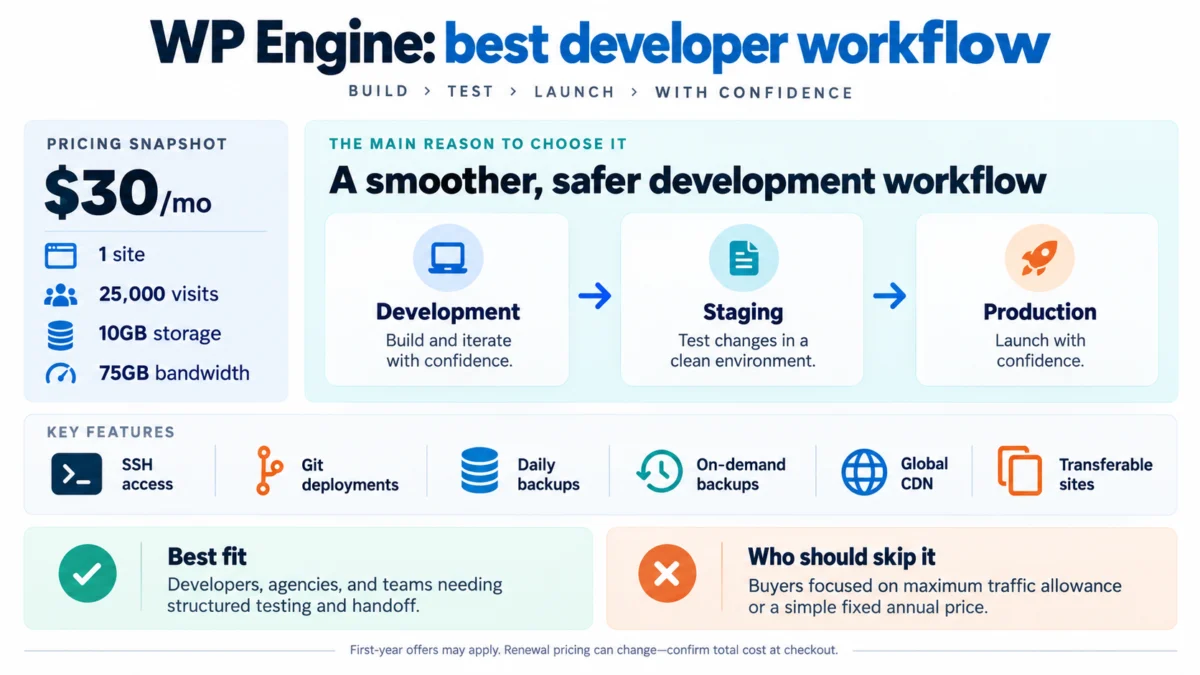
- Best developer workflow: WP Engine. Startup supports one site with 25,000 visits, 10GB storage and 75GB bandwidth, while WP Engine provides production, staging and development environments plus SSH and deployment tooling.
- Best for designers and client handoff: Flywheel. Starter is $300 per year and includes one site, 25,000 monthly visits, 10GB storage and 50GB bandwidth. Flywheel also supports Blueprints, cloning and billing transfer to clients.
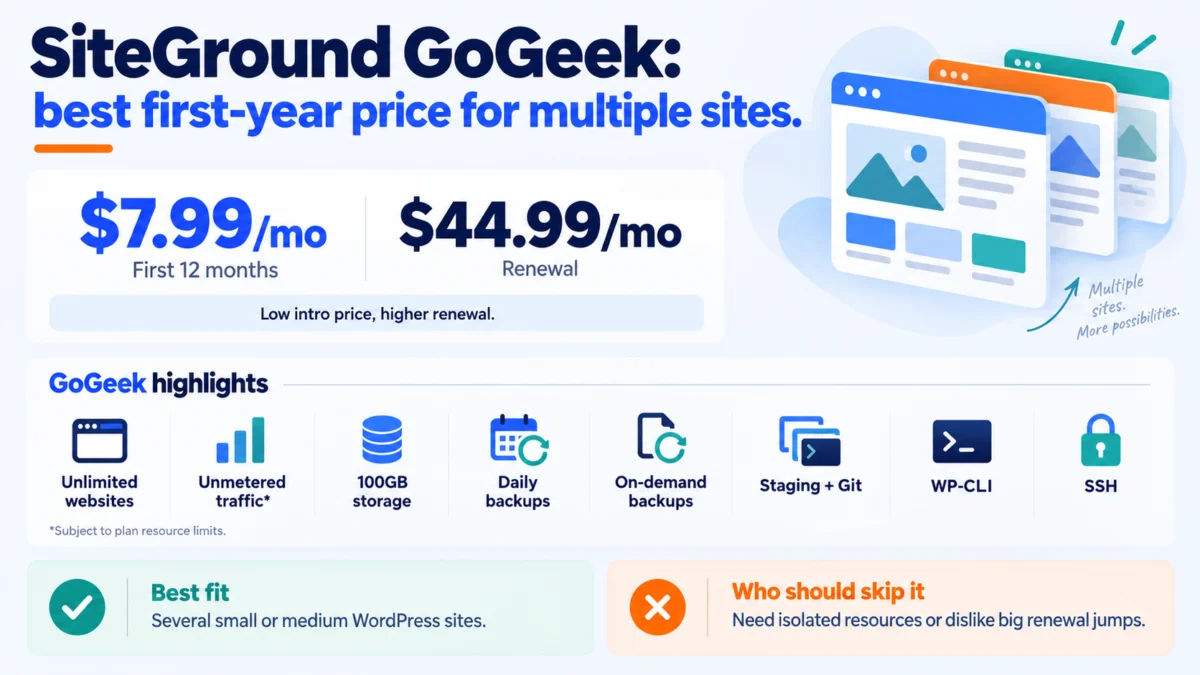
- Best first-year price for multiple sites: SiteGround GoGeek. The current US offer is $7.99 per month for 12 months and renews at $44.99 per month. It includes unlimited websites, unmetered traffic subject to resource limits, 100GB storage, staging plus Git and on-demand backups.
For a two-provider deep dive, see the HostChoices Kinsta vs WP Engine comparison. To model a different ownership period, use the web hosting cost calculator.
Evidence status and methodology
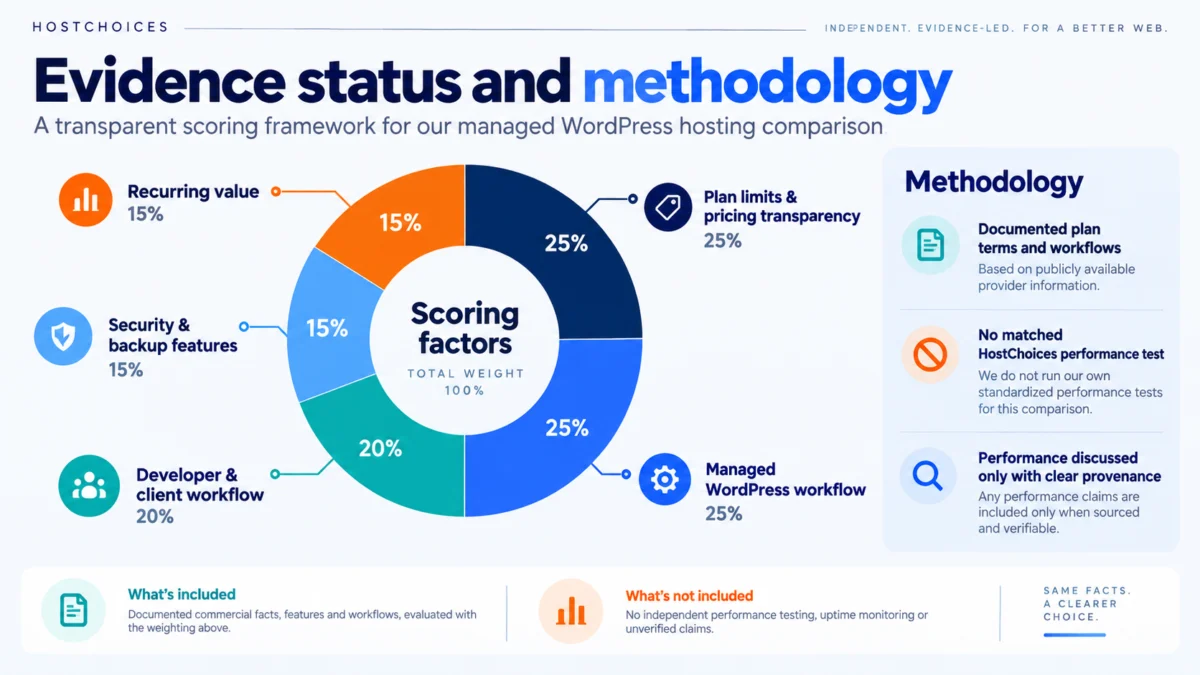
This refresh separates documented commercial facts from performance evidence. The supplied article package did not include matched raw benchmark exports for all four providers, so this page does not present HostChoices TTFB, uptime or load-test numbers as if they were measured for this article.
The editorial ranking uses five documented factors: plan limits and pricing transparency (25%), managed WordPress workflow (25%), developer and client workflow (20%), included security and backup features (15%), and recurring value (15%). Performance is discussed only when a source clearly identifies the provenance and test window; it is not used here as an unsupported scoring shortcut.
Managed WordPress hosting comparison
Prices and plan terms below were checked against current provider pages on September 20, 2026. Promotions and renewal terms can change, so verify the final cart before purchase.
| Provider and plan | Current price | Sites and traffic | Storage and bandwidth | Best fit |
|---|---|---|---|---|
| Kinsta Single 35k | $35 monthly or $350 billed annually; current offer includes a first month free | 1 site; 35,000 visits/month | 10GB storage; 125GB CDN | Single business site needing clear limits and isolated hosting |
| WP Engine Startup | Starting at $30/month; first-year offers and renewal pricing can vary | 1 site; 25,000 visits/month | 10GB storage; 75GB bandwidth | Developer and agency workflows |
| Flywheel Starter | $25/month equivalent, billed at $300/year | 1 site; 25,000 visits/month | 10GB storage; 50GB bandwidth | Designers, freelancers and client handoff |
| SiteGround GoGeek | $7.99/month for the first 12 months; renews at $44.99/month | Unlimited websites; unmetered traffic subject to resource limits | 100GB Premium Google storage | Multiple sites and low first-year cost |
1. Kinsta: best overall for a single business site
Kinsta’s current Single 35k plan is built around a clear one-site allowance: 35,000 monthly visits, 10GB storage and 125GB CDN bandwidth. The plan is $35 month-to-month or $350 billed annually, and Kinsta currently advertises a first month free for this tier.
Kinsta also documents an isolated software container for every site, with separate Linux, NGINX, PHP and MySQL resources. Its Cloudflare integration includes an enterprise-level firewall, DDoS protection and an HTTP/3 CDN. Each WordPress install can have a free standard staging environment.
Cost caveat: Kinsta charges overages when a plan exceeds its visit or server-bandwidth allowance. The current documented visit overage is $0.50 per 1,000 visits, lower than the $1 figure in the original draft.
Best fit: A revenue-producing or professional site that needs a predictable annual bill, more visit headroom than WP Engine Startup and an isolated hosting model.
Who should skip it: Sites that need several production sites on one entry plan, or projects where per-visit overages are a poor fit for unpredictable traffic.
Official references: Kinsta pricing, Kinsta infrastructure and Kinsta plan limits and overages.
2. WP Engine: best developer workflow
WP Engine’s current Startup tier starts at $30 per month and includes one site, 25,000 visits, 10GB storage and 75GB bandwidth. The provider notes that first-year offers can apply and that renewal pricing is subject to change, so the exact checkout and renewal total should be confirmed at purchase.
The stronger reason to choose WP Engine is workflow. A site can include separate production, staging and development environments. WP Engine also lists SSH access, GitHub Actions deployments, daily and on-demand backups, a global CDN and transferable sites among its managed-hosting features.
Best fit: Developers, agencies and teams that regularly test changes away from production or need a structured handoff workflow.
Who should skip it: Buyers whose main priority is maximizing entry-plan traffic allowance or locking in a simple published annual price.
Official references: WP Engine plans and WP Engine environments.
3. Flywheel: best for designers and client handoff
Flywheel’s current public pricing page centers on Starter rather than Tiny. Starter costs $25 per month equivalent when billed annually at $300 and includes one site, 25,000 monthly visits, 10GB storage and 50GB bandwidth.
Flywheel is differentiated by workflow tools for client work. Blueprints let you save a site’s themes, plugins and configuration as a reusable starting point. Site cloning is built into the dashboard, and billing can be transferred to a client while the designer or agency remains a collaborator. Flywheel also documents SSH key access.
Best fit: Freelancers, designers and creative agencies that build sites repeatedly and want an easy path from development to client ownership.
Who should skip it: Buyers who need the highest visit allowance at the same annual spend or whose workflow does not benefit from client-transfer tools.
Official references: Flywheel pricing, Flywheel Blueprints and Flywheel billing transfer.
4. SiteGround GoGeek: best first-year price for multiple sites
SiteGround GoGeek is not positioned the same way as Kinsta or WP Engine’s premium managed platforms, but it bundles many managed WordPress features at a much lower introductory price. The current US offer is $7.99 per month for 12 months, with renewal at $44.99 per month.
GoGeek currently includes unlimited websites, unmetered traffic subject to plan resource limits, 100GB Premium Google storage, daily backups, on-demand backups, staging plus Git, WP-CLI and SSH. Those terms are materially different from the older 40GB and approximate 100,000-visit figures in the draft.
Best fit: Users hosting several small or medium WordPress sites who value a low first-year cost and built-in staging.
Who should skip it: Buyers who want isolated entry-level resources or who do not want a large price increase after the introductory term.
Official reference: SiteGround WordPress hosting.
Long-term cost: check the renewal structure, not just month one
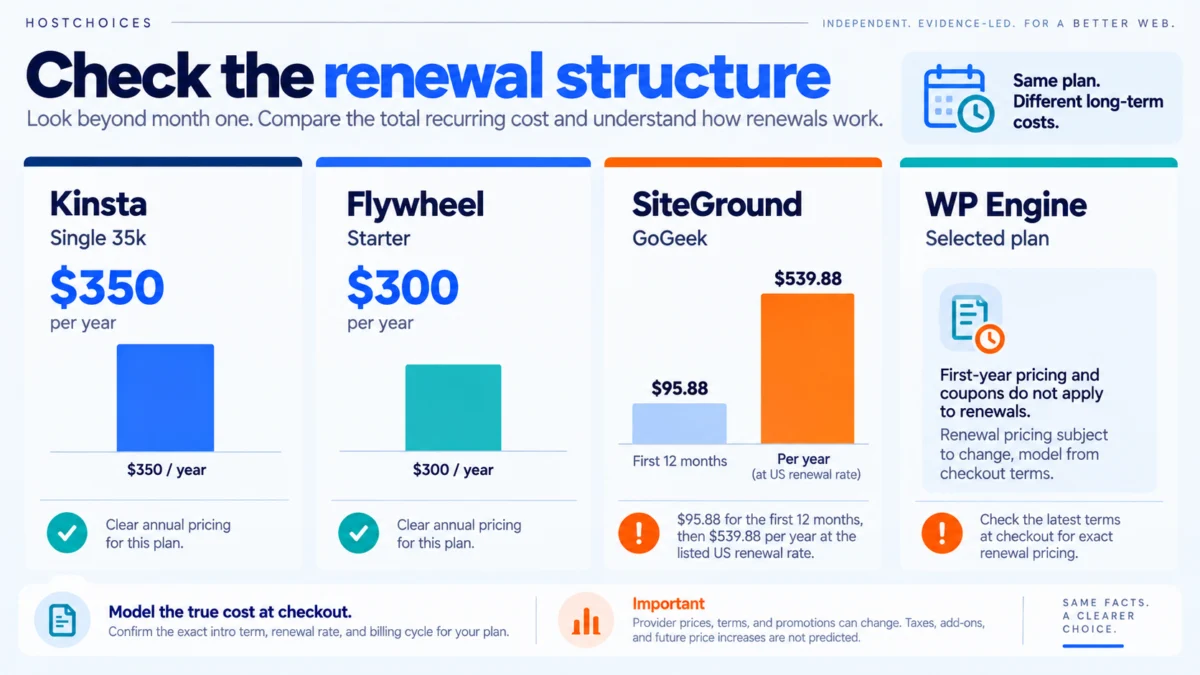
The current prices illustrate why a single monthly headline can be misleading. Kinsta publishes a $350 annual price for Single 35k. Flywheel publishes $300 per year for Starter. SiteGround GoGeek is $95.88 for the first 12 months at the current offer, then $539.88 per year at the listed US renewal rate. WP Engine says its first-year pricing and coupons do not apply to renewals and that renewal pricing is subject to change, so its exact multi-year total should be modeled from the checkout terms you actually receive.
Use the HostChoices cost calculator with the exact intro term, renewal rate and billing cycle shown at checkout. Future provider price changes, taxes and add-ons cannot be predicted by this article.
Which managed WordPress host should you choose?
- Choose Kinsta when one site, higher entry-plan visit headroom, isolated containers and clear annual pricing matter most.
- Choose WP Engine when your team relies on separate production, staging and development environments or structured deployment workflows.
- Choose Flywheel when client billing transfer, Blueprints and design-agency workflow matter more than squeezing the most traffic out of the entry plan.
- Choose SiteGround GoGeek when you need several sites and the first-year budget matters, provided you are comfortable with the published renewal jump.
Frequently asked questions
What is managed WordPress hosting?
Managed WordPress hosting combines WordPress-specific infrastructure or tooling with tasks such as backups, caching, updates, staging and security controls. The exact scope varies by provider, so compare the included features and plan limits rather than assuming every managed plan offers the same environment or support model.
Are visit limits strictly enforced?
That depends on the provider. Kinsta publishes visit allowances and overage fees, while Flywheel also charges visit overages. WP Engine lists visit estimates and advises customers with traffic spikes or dynamic workloads to contact the company before purchase. SiteGround advertises unmetered traffic on GoGeek but still applies hosting-resource limits.
Do these plans include a CDN?
Yes, each provider documents an included CDN or CDN capability on the plans discussed here. The implementation and traffic allowances differ, so a CDN checkbox alone should not decide the purchase.
Sources checked for this refresh
- Kinsta pricing, checked September 20, 2026.
- Kinsta plan limits and overages, checked September 20, 2026.
- Kinsta infrastructure, checked September 20, 2026.
- WP Engine plans, checked September 20, 2026.
- WP Engine environments, checked September 20, 2026.
- Flywheel pricing, checked September 20, 2026.
- Flywheel billing transfer, checked September 20, 2026.
- SiteGround WordPress hosting, checked September 20, 2026.