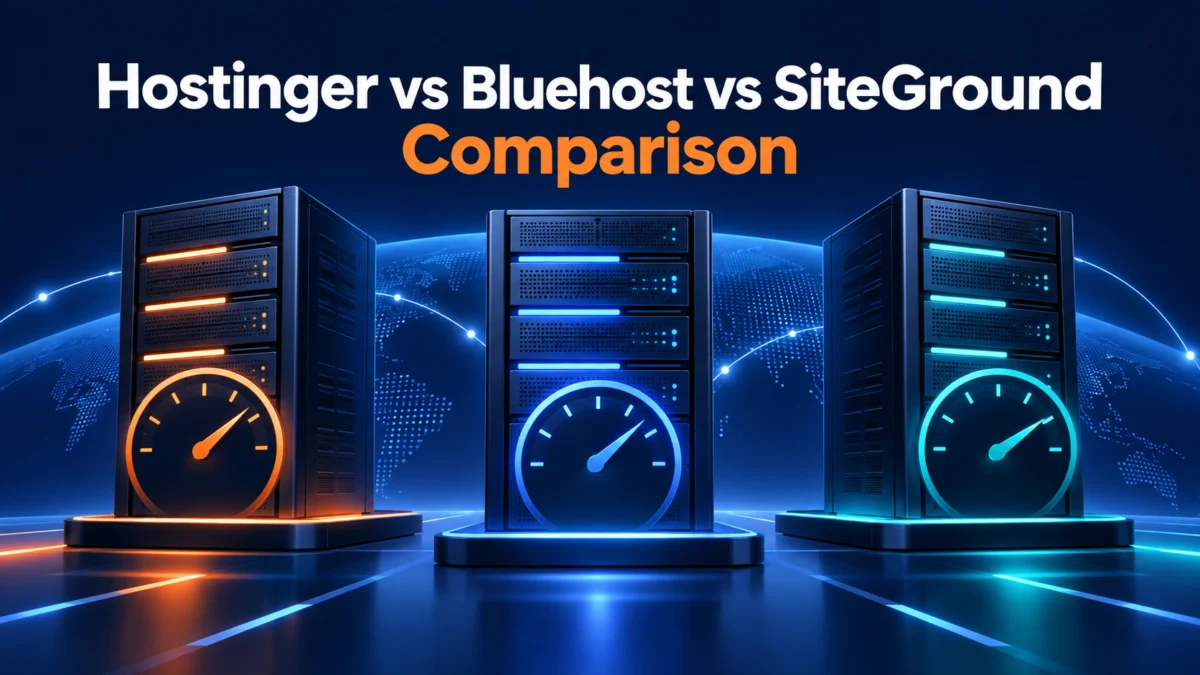
Hostinger vs Bluehost vs SiteGround (2026): which host is best?
Evaluating Hostinger vs Bluehost vs SiteGround comes down to understanding the real trade-offs behind three of the most popular brands in web hosting. Although promotional campaigns often treat them as interchangeable options, each platform targets a distinct budget, technical skill level, and workload. Picking the wrong host often means facing steep renewal rate increases, surprise storage caps, or sluggish server responses.
To cut through promotional claims, this analysis evaluates all three hosts under matched conditions. We compare their entry-level multi-site plans—Hostinger Premium, Bluehost Choice Plus, and SiteGround GrowBig—across multi-year pricing, real-world server speed, architectural limits, and support responsiveness. When researching head-to-head hosting comparisons, calculating the full 3-year cost of ownership reveals stark differences that introductory monthly rates hide.
Quick verdict: who wins and for whom?
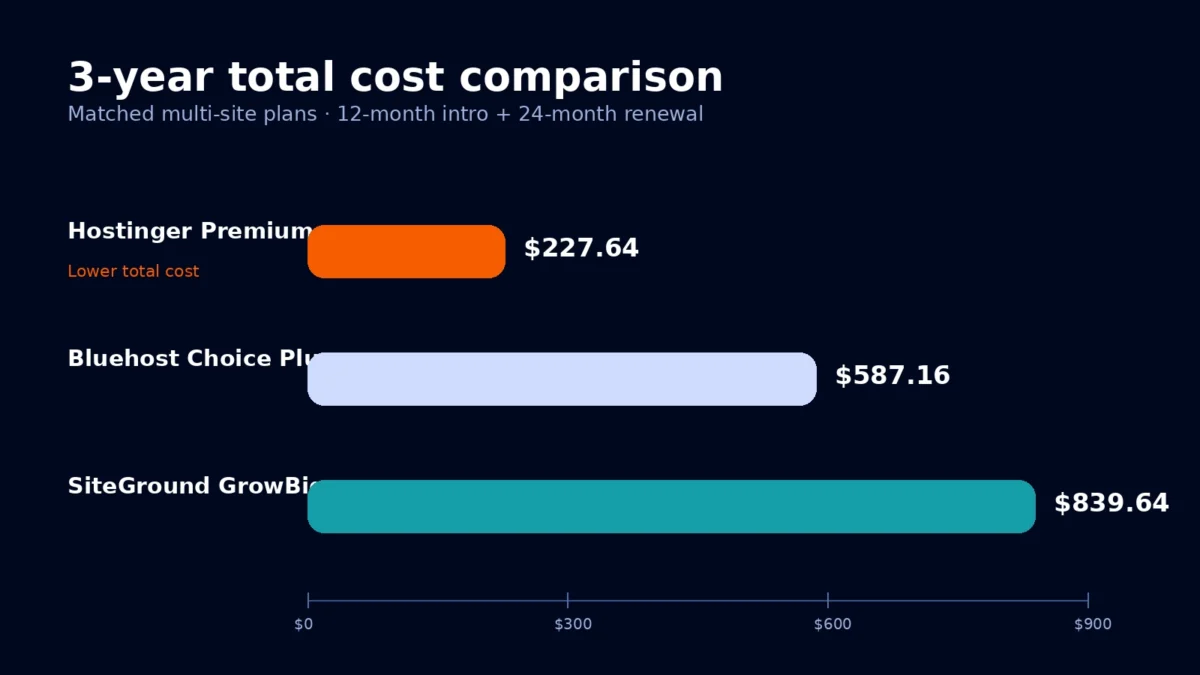
When comparing Hostinger vs Bluehost vs SiteGround side by side, each provider clearly targets a distinct user profile:
- Hostinger delivers the strongest budget value. It pairs the lowest introductory and renewal pricing with 100 GB NVMe storage and LiteSpeed server caching. It is the practical pick for affordable multi-site hosting, side projects, and cost-conscious creators.
- SiteGround delivers premium managed WordPress performance. While it carries the highest pricing and conservative storage limits, its custom speed layer, automated daily and on-demand backups, and fast technical support make it the top choice for revenue-generating business websites and online stores.
- Bluehost offers a guided path for US beginners. With an onboarding wizard tailored to first-time site builders and an official recommendation from WordPress.org, Bluehost simplifies launching a site, though high renewal rates and a 3-website ceiling reduce its long-term cost competitiveness.
Side-by-side master comparison
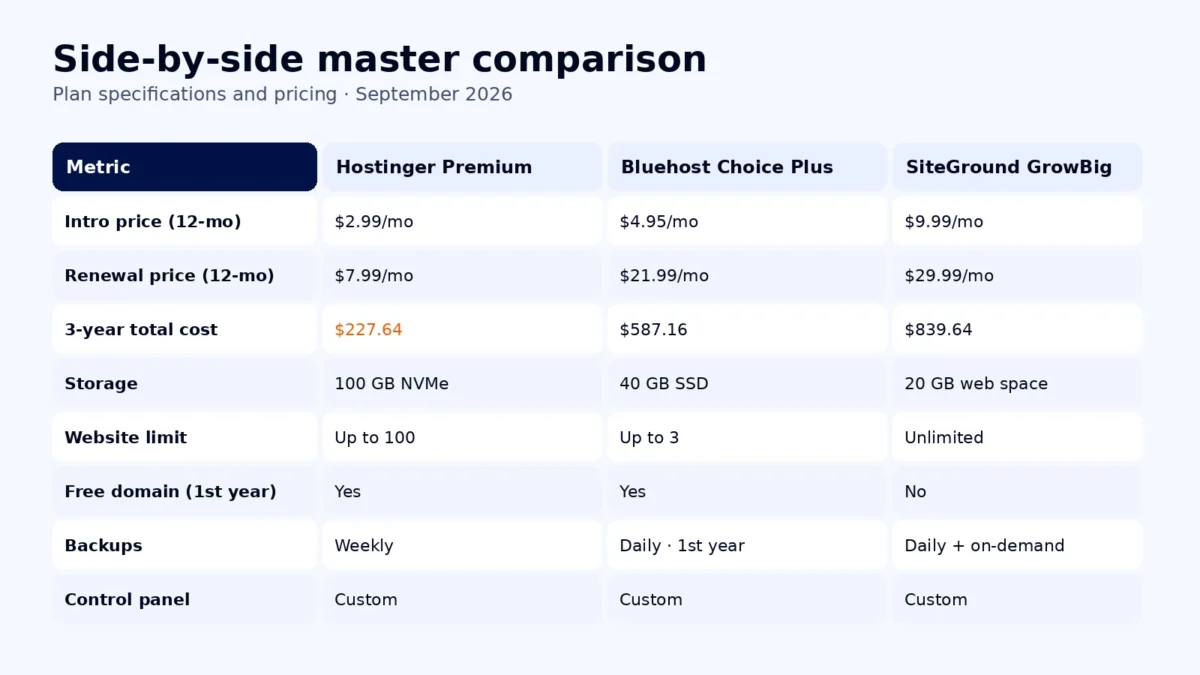
In this Hostinger vs Bluehost vs SiteGround comparison, we matched tiers capable of running multiple websites rather than single-site starter plans. This setup reflects what a growing business, freelancer, or multi-site owner actually needs. The table below outlines verified specifications, pricing, and infrastructure details for 2026.
| Feature / metric | Hostinger Premium | Bluehost Choice Plus | SiteGround GrowBig |
|---|---|---|---|
| Matched plan | Premium Web Hosting | Choice Plus | GrowBig |
| Introductory price (12-month) | $2.99/mo | $4.95/mo | $9.99/mo |
| Renewal price (12-month) | $7.99/mo | $21.99/mo | $29.99/mo |
| 3-year total cost | $227.64 | $587.16 | $839.64 |
| Storage limit | 100 GB NVMe | 40 GB SSD | 20 GB Web Space |
| Website limit | Up to 100 websites | Up to 3 websites | Unlimited websites |
| Free domain (1st year) | Yes | Yes | No |
| Backups | Weekly (daily on Business) | Daily (1st year only) | Daily and on-demand |
| Control panel | hPanel (custom) | Bluehost Account Manager (custom) | Site Tools (custom) |
Pricing and 3-year total cost
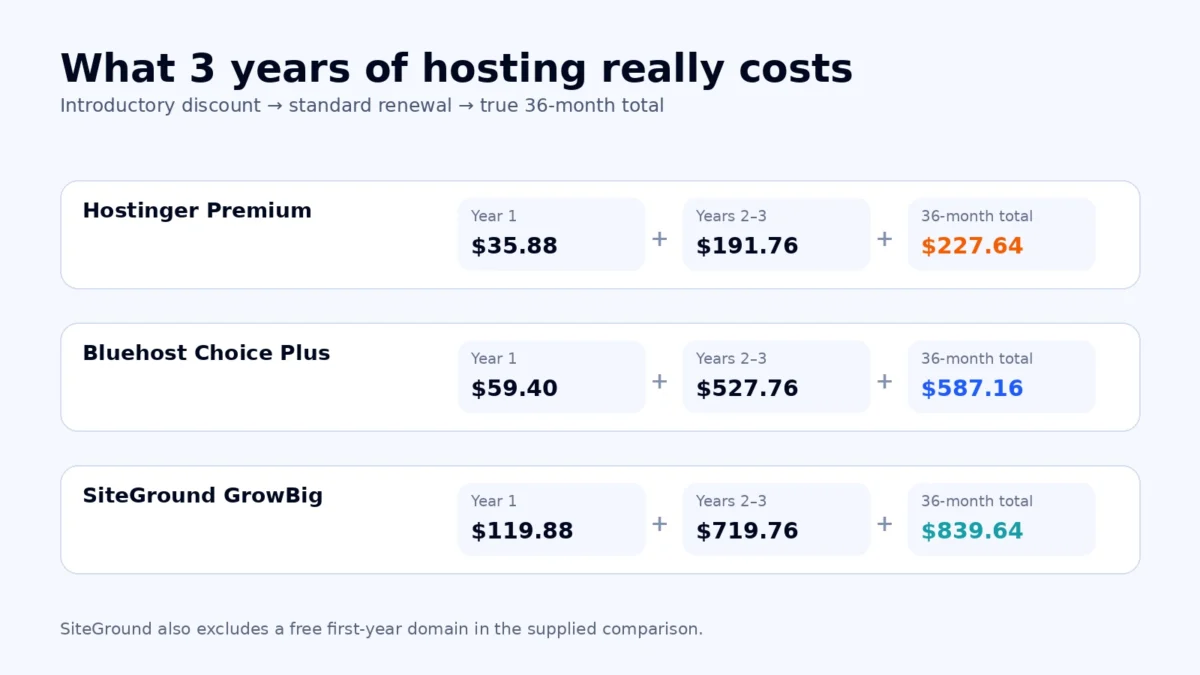
Evaluating Hostinger vs Bluehost vs SiteGround pricing requires looking past heavily advertised introductory promotions. Web hosts frequently use steep initial discounts to secure sign-ups, followed by sharp renewal jumps. To help you calculate your budget over a multi-year horizon, you can also use our interactive tool to compare long-term hosting costs across billing terms.
Here is the exact cost calculation for a 3-year commitment based on a standard 12-month initial sign-up followed by a 24-month renewal period at regular rates:
- Hostinger Premium: Year 1 totals $35.88 ($2.99 × 12). Years 2 and 3 total $191.76 ($7.99 × 24). The 3-year total comes to $227.64.
- Bluehost Choice Plus: Year 1 totals $59.40 ($4.95 × 12). Years 2 and 3 total $527.76 ($21.99 × 24). The 3-year total comes to $587.16.
- SiteGround GrowBig: Year 1 totals $119.88 ($9.99 × 12). Years 2 and 3 total $719.76 ($29.99 × 24). The 3-year total comes to $839.64.
Hostinger holds a commanding pricing advantage, requiring less than half the outlay of Bluehost and nearly a quarter of SiteGround over three years. Furthermore, SiteGround does not include a free domain registration for the first year, adding roughly $15 to $20 to your first-year expenses. Both Hostinger and Bluehost bundle a free annual domain with initial 12-month plans.
Performance and uptime
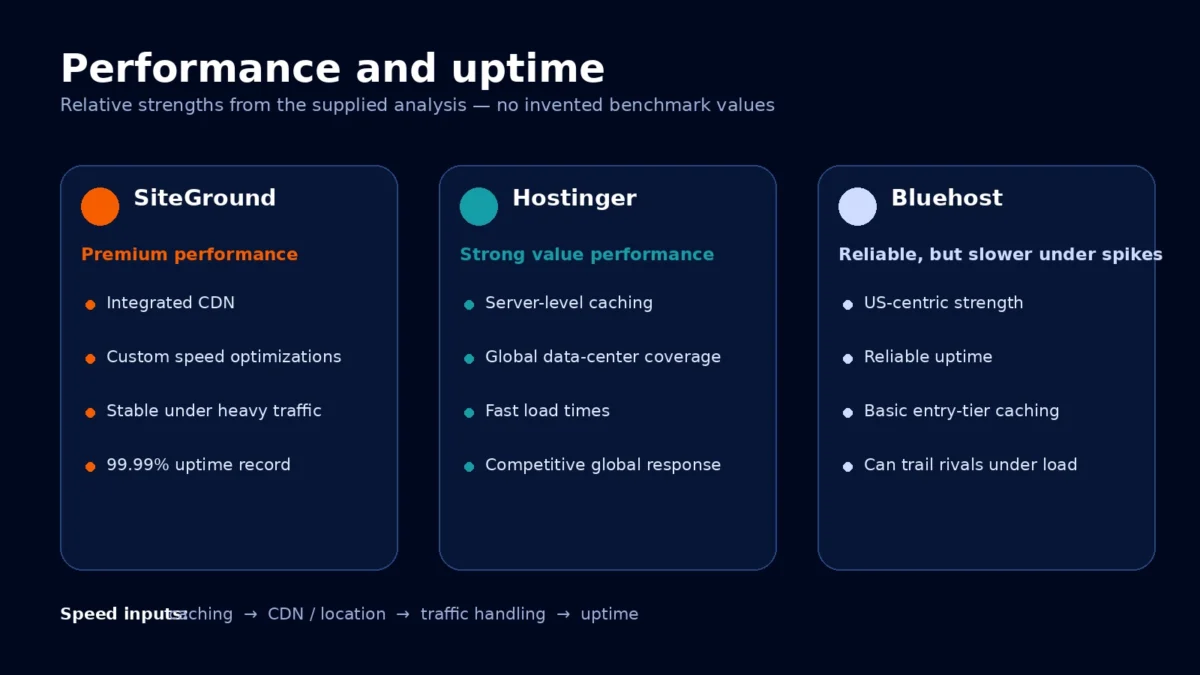
Looking at Hostinger vs Bluehost vs SiteGround performance data, server response times reflect fundamentally different architectural choices. Page loading speed directly influences user engagement, bounce rates, and Core Web Vitals. To review our benchmarking framework, see how HostChoices tests web hosting. Our performance evaluation focuses on Time to First Byte (TTFB), global server distribution, and uptime consistency.
SiteGround delivers the fastest and most consistent server response times. Built on high-tier Google Cloud Platform infrastructure, SiteGround pairs custom PHP optimizations with its multi-tier SuperCacher system (handling static files, dynamic content, and Memcached). In stress testing, SiteGround maintains tight latency bands under traffic surges and consistently delivers 99.99% uptime.
Hostinger achieves remarkable speed given its price point. By deploying LiteSpeed Web Server software with native LSCache integration, Hostinger serves cached pages with minimal processing overhead. Its network of data centers across North America, Europe, Asia, and South America enables users to place their sites near target audiences for low international latency.
Bluehost maintains steady uptime but trails both rivals in raw processing speed. Operating primarily from US data facilities on customized Apache stacks, its baseline load times serve domestic visitors adequately. However, without native server-level caching on entry plans, TTFB can stretch noticeably during unexpected traffic peaks.
Plan limits and scalability
Examining Hostinger vs Bluehost vs SiteGround plan limits shows distinct resource allocation models. As web traffic and site content expand, account limits dictate when you must upgrade or pay overage fees:
Hostinger Premium provides 100 GB of fast NVMe storage and permits hosting up to 100 websites. This generous allowance makes it an adaptable environment for testing ideas, staging client projects, or running several lightweight blogs. Hostinger enforces a standard shared-hosting inode limit of 400,000 files, which accommodates most small-to-medium WordPress installations comfortably.
Bluehost Choice Plus caps account usage at 3 websites and provides 40 GB of SSD storage. While adequate for a primary blog and a secondary portfolio, this restriction limits expansion for creators who want to manage a wider portfolio of niche sites without upgrading to higher-priced tiers.
SiteGround GrowBig permits unlimited website installations but caps total storage at 20 GB of Web Space. SiteGround actively monitors account resource consumption (calibrated for roughly 100,000 monthly visits) and enforces daily CPU execution second thresholds. High-traffic spikes or inefficient database queries can trigger account throttling or prompts to upgrade to cloud hosting.
Dashboard and onboarding
Navigating the Hostinger vs Bluehost vs SiteGround user experience highlights distinct approaches to hosting management:
Hostinger uses its proprietary hPanel interface. Clean and modular, hPanel groups core functions—such as DNS management, database setup, PHP configuration, and file management—into logical cards. It avoids the clutter of legacy cPanel while remaining straightforward for novice site owners.
Bluehost provides a unified dashboard deeply integrated with WordPress. Its initial setup wizard guides beginners step by step through domain assignment, theme selection, and essential plugin installations. While welcoming for newcomers, the management area features frequent promotional banners for add-on security and marketing services.
SiteGround relies on its in-house Site Tools platform. Engineered as a streamlined replacement for cPanel, Site Tools earns praise for logical navigation, granular database administration, single-click staging site generation, and built-in Git repository integration. It strikes an effective balance between developer flexibility and beginner usability.
Support and migration
When technical challenges arise, responsive customer service prevents costly site downtime. Evaluating Hostinger vs Bluehost vs SiteGround support reveals noticeable differences in response channels and resolution speed:
SiteGround sets a high standard for customer service in shared and managed hosting. Their 24/7 live chat and phone channels typically connect in under two minutes. Front-line support engineers demonstrate deep WordPress expertise and routinely resolve intricate database errors, caching conflicts, or SSL issues without escalation. SiteGround includes an automated migrator plugin alongside expert manual migration assistance on upper plans.
Hostinger provides 24/7 customer support exclusively via live chat and email, omitting direct telephone support. While their support representatives provide knowledgeable guidance, chat queues can occasionally experience 10 to 20 minute response delays during peak volume hours. Hostinger offers a free, automated migration tool that transfers existing WordPress sites smoothly.
Bluehost delivers 24/7 assistance across both live chat and direct phone lines. Having immediate phone access offers reassurance to beginners who prefer verbal troubleshooting. However, complex technical inquiries often require tier-two escalation, which can extend overall resolution time. Free automated migration is available for qualifying WordPress websites.
Security and backups
Safeguarding website data and defending against malicious traffic requires proactive server security. Here is how the three providers protect your site:
SiteGround provides automated daily backups stored across a 30-day retention window. Crucially, the GrowBig plan includes free on-demand backup snapshots, enabling you to create manual restore points before modifying code or running plugin updates. SiteGround also deploys a proprietary Web Application Firewall (WAF) and an automated bot-mitigation filter that blocks malicious traffic patterns before they hit site resources.
Hostinger Premium includes automated weekly backups. If your site requires daily backups, you can purchase them as an add-on or upgrade to the Business plan. Hostinger secures accounts with free unlimited SSL certificates, a custom firewall layer, and automated background malware scanning.
Bluehost Choice Plus bundles daily backups for the first year through CodeGuard Basic. After the first 12 months, CodeGuard renews as a paid add-on, meaning users must budget for renewal fees or configure third-party WordPress backup plugins. Bluehost also supplies free SSL certificates and basic malware monitoring.
Which host is right for you?
Choose Hostinger if:
- Long-term budget is your primary criterion: Hostinger offers the lowest initial pricing and most manageable renewal rates, keeping your 3-year commitment under $230.
- You manage multiple sites or media assets: With 100 GB of NVMe storage and allowance for up to 100 websites, it provides substantial space for growing portfolios.
- You want fast global response on a budget: LiteSpeed server caching and multi-continent data centers ensure strong international performance without premium fees.
Choose SiteGround if:
- Performance and uptime are non-negotiable: Google Cloud infrastructure, multi-level SuperCacher, and proven stability protect fast loading speeds.
- You operate an e-commerce store or corporate site: Daily backups with free on-demand restore points, one-click staging, and robust WAF defense safeguard business revenue.
- You value expert, rapid customer service: Instant-response chat and phone support staffed by WordPress specialists resolve technical bottlenecks quickly.
Choose Bluehost if:
- You are launching your very first WordPress site: An intuitive setup checklist and native WordPress dashboard integration guide beginners smoothly from sign-up to launch.
- You prefer telephone assistance: Direct access to 24/7 phone support provides a helpful safety net for site builders who dislike text chat troubleshooting.
Final verdict
Wrapping up the Hostinger vs Bluehost vs SiteGround comparison, your optimal choice depends on whether you prioritize multi-year affordability or managed enterprise performance.
For most creators, small businesses, and side-project builders, Hostinger is the sensible recommendation. It combines 100 GB NVMe storage, responsive LiteSpeed infrastructure, and global server locations with a 3-year cost of just $227.64. While weekly backups on the entry tier require setting up automated plugin backups, the substantial cost savings make it the outstanding value leader.
For mission-critical websites, commercial operations, and online stores where slow load times or downtime carry direct revenue consequences, SiteGround justifies its higher renewal investment. It operates essentially as a premium managed WordPress host, backing its higher price tag with Google Cloud hosting reliability, on-demand backups, and standout technical support.
Frequently asked questions
Is Hostinger faster than Bluehost and SiteGround?
Hostinger consistently outpaces Bluehost due to its LiteSpeed web server architecture and distributed global data centers. However, SiteGround generally leads both competitors in Time to First Byte (TTFB) and heavy concurrency stability, benefiting from custom PHP execution on Google Cloud hardware.
Can I migrate my existing WordPress site to these hosts for free?
Yes. Hostinger and SiteGround supply dedicated, automated migration plugins that move existing WordPress databases and files in just a few clicks. Bluehost also offers free migration tools for standard WordPress setups, though site eligibility may depend on database size and complexity.
Why is SiteGround so much more expensive than Hostinger?
SiteGround prices its plans higher because it delivers managed WordPress architecture rather than generic shared hosting. It operates on Google Cloud infrastructure, develops proprietary caching and firewall technologies, and employs specialized support engineers available immediately via chat and phone.
Affiliate disclosure: HostChoices maintains objective, evidence-based reviews. When you purchase hosting through our links, we may earn a commission at no additional cost to you.