
IONOS vs Bluehost: Discover the true 36-month costs and best WordPress fit
For a small WordPress site, Bluehost Starter has the lower modeled 36-month hosting cost. IONOS Start offers a mailbox, more storage and daily restore history in a single-site bundle. The IONOS vs Bluehost decision gets closer when you add paid email to Bluehost and account for the support and recovery tools your site needs.
US market, USD. Public offers and documentation checked October 16, 2026. Prices below are advertised-rate calculations, excluding taxes and extras. The final checkout baskets could not be verified. This comparison does not include firsthand performance or support testing.
Quick verdict: choose by workload and commitment
- Bluehost Starter: the lower-cost hosting choice in the three-year model, if you accept a 36-month prepaid term and your sites fit its shared storage allowance.
- IONOS Start: the more complete one-site bundle for a buyer who needs included email, daily recovery history and telephone support.
- IONOS Grow: the lowest first-year hosting cost among these offers. Its higher later rate makes the modeled three-year total exceed Start.
These are conditional recommendations from published specifications and calculations. They do not establish a winner for loading speed, measured uptime or support quality.
The US WordPress plans compared
The main comparison pairs IONOS Start with Bluehost Starter for a modest WordPress website. Grow is the promotional alternative within IONOS. These plans can serve a similar workload, but their capacity and contract terms differ.
| Decision factor | IONOS Start | IONOS Grow | Bluehost Starter |
|---|---|---|---|
| Quoted introductory commitment | 12 months | 12 months | 36 months |
| Websites | 1 | 1 | Up to 10 within the plan allocation |
| Advertised storage | 25 GB SSD | 50 GB SSD | 10 GB total; card says NVMe SSD, feature table says SSD |
| Bundled email | 1 address | 5 addresses | One-month Professional Email trial; ongoing service costs extra |
| Included backup cadence | Daily | Daily; Jetpack Vault advertised for 12 months | Weekly |
| Support access | 24/7 service; free personal consultant available | 24/7 service; free personal consultant available | 24/7 chat; phone excluded at this tier |
Sources: IONOS WordPress plans, Bluehost WordPress plans and IONOS consultant access. Backup and restore conditions are explained below.
Bluehost’s two storage descriptions agree on capacity but differ on the hardware label. Use 10 GB for sizing; do not infer a speed advantage from NVMe wording. All sites share that allowance. For a broader shortlist, see Hostinger, Bluehost and SiteGround compared.
IONOS vs Bluehost: What hosting really costs over 36 months
The public US IONOS offers list Start at $5 per month with a one-year term, then $8 per month; Grow at $1 per month with a one-year term, then $12. Bluehost Starter is advertised at $3.99 per month for a 36-month initial term. No additional coupon or member discount is assumed.
| Plan | Year 1 allocation | Years 2–3 allocation | 36-month hosting |
|---|---|---|---|
| IONOS Start | $60.00 | $192.00 | $252.00 |
| IONOS Grow | $12.00 | $288.00 | $300.00 |
| Bluehost Starter, 36-month initial term | $47.88 | $95.76 | $143.64 |
The formulas are 12 × $5 + 24 × $8 for Start, 12 × $1 + 24 × $12 for Grow, and 36 × $3.99 for Starter. They assume continued service and unchanged rates after the introductory period.
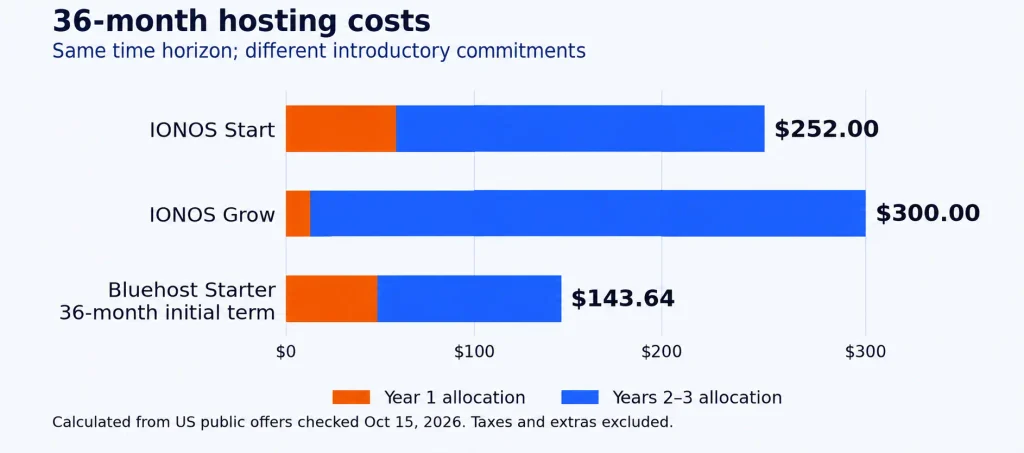
Annual allocation is not an invoice schedule. Under Bluehost’s payment terms, the full selected term is paid in advance. The advertised base hosting amount for this purchase therefore calculates to $143.64 at signup, before taxes and additions. IONOS’s billing guidance describes monthly or annual billing options for many products; confirm the options and amount due for the exact order.
Grow saves $48 against Start during year 1, then costs $4 more per month. Those savings are exhausted after 12 further months: the hosting totals tie at $156 at month 24. By month 36, Grow costs $48 more. Choose it for the extra allocation or short initial budget, rather than assuming the lowest introductory rate produces the lowest long-term bill.
A shorter contract changes the renewal model
Bluehost’s renewal schedule lists Starter at $11.99 per month for a 12-month renewal term and $9.99 for a 36-month renewal term. The $9.99 rate begins after the initial three-year purchase in the model above; it is not charged during those first 36 months.
A one-year initial purchase needs its own introductory quote. At the published annual renewal rate, the next two years alone calculate to 24 × $11.99 = $287.76, before the first-year bill. Do not apply the three-year introductory price to an annual purchase. Shorter commitment and lower upfront payment may still be worth paying more for.
Email can change the price comparison
IONOS Start includes one address. Bluehost’s hosting email trial lasts one month and automatically renews unless disabled. The hosting offer states a $2.99 monthly renewal. A separate annual Professional Email Pro purchase has a different price and purchase route.
| Scenario | Email calculation | Hosting plus email |
|---|---|---|
| IONOS Start | Included address; no added email charge | $252.00 |
| Bluehost Starter plus monthly trial renewal | 35 × $2.99 = $104.65 | $248.29 |
| Bluehost Starter plus separate annual Email Pro | $19.99 + 2 × $29.99 = $79.97 | $223.61 |
The annual example uses the exact yearly totals in Bluehost’s email plan comparison. It assumes a new annual Pro purchase from month 1, without the hosting trial. It is not a promised conversion price for that trial. The email pricing page displays rounded monthly equivalents for annual billing; multiplying those rounded figures would not reproduce the help page’s exact totals.
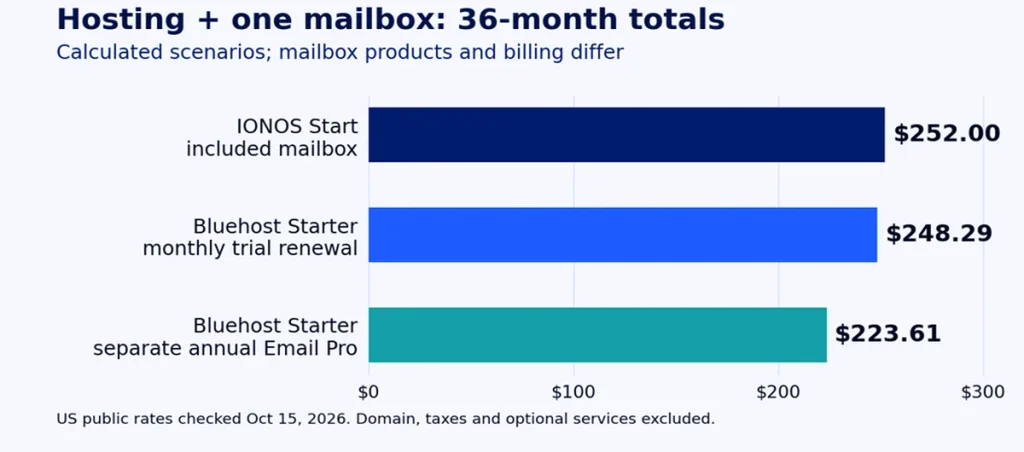
The monthly-email scenario leaves just $3.71 between Bluehost and IONOS Start; the annual alternative leaves $28.39. These are calculated differences, not complete checkout quotes or identical mailbox products. Domain renewals, backup upgrades or migration assistance could change the result. If you already use another email service, keep its cost consistent on both sides.
Build the full basket before choosing
Your budget needs hosting, email, domain registration and renewals, selected backup or security services, migration assistance and applicable taxes. The tables exclude domain charges, optional privacy, paid backup upgrades, paid migration, taxes and future rate changes. They compare one mailbox, not a five-person team.
Check each item’s billing period and renewal price. A free first-year service does not establish the price of later years. Use the hosting cost calculator to work through your selected basket.
Performance and uptime: no demonstrated winner for these plans
The evidence reviewed for this comparison does not contain a matched test of these exact US plans with the same site, server location, cache settings and measurement window. Storage labels, advertised visit guidance and uptime promises cannot establish which will load your site faster.
The EXPERTE WordPress study, updated August 10, 2026, describes an Elementor demo monitored for six weeks on a plan around $20. That is useful methodological context, but it does not establish current entry-plan parity here. Its performance figures are not used to award a winner.
Bluehost’s SLA explanation advertises a 99.99% shared-hosting uptime promise with a conditional 5% monthly credit. IONOS’s general terms also describe a 99.99% uptime threshold with credit conditions and exclusions. These are contractual remedies, not measured availability or compensation for lost sales.
WordPress tools, storage and scaling
Bluehost’s Starter specification lists staging, caching, SSH and WP-CLI. Staging gives you a separate copy for checking changes before deployment. That is useful for an owner who regularly changes themes or plugins, although the workflow was not tested firsthand for this article.
IONOS’s performance-level documentation ties Start and Grow to fixed plan levels. Those levels cannot be adjusted individually within these WordPress packages. Assess a plan change if you need more resources.
Capacity can decide the purchase before price does. A 15 GB site exceeds Starter’s advertised storage allowance. Ten supported sites do not each receive 10 GB. Count files, databases, staging copies and locally stored backups against the relevant limits. For a busy store, also assess database activity, plugins and recovery needs; an advertised monthly visit figure is not a performance guarantee.
Before relying on either setup, check domain connection, SSL activation, update controls and a recovery route. No subjective dashboard ease-of-use score is assigned without hands-on evidence.
Support and migration: access matters more than promises
IONOS advertises 24/7 customer service including telephone access and lets customers activate a free personal consultant. That does not mean the same consultant is available around the clock. Bluehost Starter lists 24/7 chat but excludes phone support; its Business tier lists phone access. If telephone help is essential, compare the appropriate tier and its cost.
The documented access favors IONOS in this entry-plan pairing. Resolution speed and support quality remain unranked. Bluehost’s WordPress support scope also separates tasks support performs from guidance, escalation and excluded development work. Do not assume a hosting subscription includes maintaining custom code.
Moving an existing site
Bluehost’s self-service migration guide documents an InstaWP-powered tool. If a transfer fails, the guide points to paid professional migration or an InstaWP support request. The included tool does not establish free engineer-managed migration for every site.
IONOS’s migration guide describes plugin and manual routes. It does not establish an included concierge transfer. Bluehost has the clearer included self-service option in these documents; price any hands-on assistance separately.
A practical migration acceptance check
- Export the website files and database before starting.
- Keep the old hosting active while checking the migrated copy.
- Test important pages, login, images, forms and redirects.
- For a store, verify payments, order emails and the handling of new orders during the move.
- Confirm domain DNS and mailbox records before switching traffic.
- Take a fresh backup and verify the restore route before canceling the old account.
These are recommended acceptance checks, not automatic capabilities claimed for either tool. Include suitable assistance in the budget if a missed order or broken form would cost more than the hosting saving.
Backups and recovery: compare cadence and restore access
IONOS’s restore guide specifies one backup per day with up to seven days available. You can restore the installation and database through the account. The site is unavailable during restoration, and later changes, including orders, are overwritten.
| Recovery question | IONOS WordPress | Bluehost Starter |
|---|---|---|
| Included cadence and history | Daily; up to seven days in the WordPress restore history | Weekly; Basic Weekly Backup guide describes one retained restore point |
| Documented restore route | Account restore of installation and database | Portal self-service restore and download options |
| Additional product | Grow advertises Jetpack Vault for 12 months; later charges excluded from the model | Paid backup products are excluded from the model |
| Main caution | Restore replaces changes since the selected backup | Confirm account eligibility, database coverage and any assisted-restore fee; website backups exclude email |
Bluehost’s Basic Weekly Backup guide documents self-service recovery, one retained restore point and no email backup. Its general backup policy describes account limits and a fee for support-assisted restoration. Those are different routes; confirm which applies to your account rather than assuming every restore is free.
IONOS has the stronger documented included cadence in this pairing. That is a specification advantage, not a tested recovery result. A store can still lose orders placed after its latest snapshot. Consider more frequent backups, an offsite copy and a restore drill when the business cannot tolerate that loss.
Security coverage and refund limits
Scanning and cleanup are different services. IONOS Start and Grow advertise malware scanning; automatic repair belongs to a higher tier. Bluehost’s Starter feature table marks malware detection/removal as excluded even though the plan card lists it. Do not budget on included malware cleanup in Starter until Bluehost confirms the entitlement for the exact order. A firewall or scan does not replace current plugins, strong authentication and an independent recovery copy.
Both product pages advertise a 30-day hosting money-back guarantee, but the conditions matter. Bluehost’s agreement limits the guarantee to eligible plans and credit-card payments; monthly-term products, domain fees, setup charges and additional services are excluded. A free-domain registration can reduce the refund by its standard registration fee. Check the applicable offer and IONOS guarantee terms before treating any add-on or domain payment as refundable.
Billing frequency and minimum commitment are separate. A monthly invoice does not by itself mean cancel-anytime service. Check the remaining term, cancellation deadline, renewal setting and refund eligibility before paying.
Which provider fits your WordPress site?
Choose Start when its single-site allocation and bundled services match your needs. Grow makes sense for additional storage or mailboxes, or the lower initial hosting bill, if you accept the higher projected later cost. For several sites, compare a suitable multi-site product rather than multiplying Start’s entitlement.
Choose Starter when its shared capacity and WordPress tools fit, the prepaid commitment is acceptable, and chat support and weekly recovery suit the site. Compare a higher-tier or upgraded basket if you need phone support, more storage, daily backups or confirmed malware cleanup. The entry price cannot stand in for those additions.
| Your priority | Preferred fit | Condition that changes it |
|---|---|---|
| Lowest modeled three-year hosting cost | Bluehost Starter | Requires the 36-month introductory term |
| One site, mailbox and daily history | IONOS Start | Compare the cost of email and any backup upgrade on Bluehost |
| Lowest first-year hosting cost | IONOS Grow | Its projected later cost exceeds Start |
| Several small sites and staging | Bluehost Starter | Every site must fit the shared resources |
| Faster server or better measured uptime | No winner established | Requires matched tests of the exact plans |
Before you place the order
Record the plan, initial term, amount due now, renewal term, mailbox product, domain renewals, backup access and cancellation conditions. Remove unwanted optional products. Confirm any migration assistance and security service you are paying for. A small price gap should not outweigh a recovery or support requirement the cheaper basket cannot meet.
The conditional value pick is Bluehost Starter for the defined three-year small-site hosting scenario. IONOS Start is the stronger bundled choice for one site when its included services meet your needs. No tested speed or support-quality winner is claimed.
Official provider links, non-affiliate: review IONOS’s WordPress offers and terms and Bluehost’s WordPress offers and terms. Compare the complete basket before buying.
HostChoices is an affiliate-supported publication. This article uses non-affiliate provider links; affiliate availability does not determine its recommendations.