
How to choose web hosting: the best 2026 decision guide
Understanding how to choose web hosting is one of the most critical technical decisions you will make when launching a website. Your hosting environment directly dictates page delivery speed, security posture, server availability, and ongoing operating expenses. Yet the hosting market in 2026 is crowded with steep renewal price hikes, aggressive introductory promotions, and confusing technical claims.
Evaluating providers requires looking past introductory promotional discounts to calculate the real 36-month total cost of ownership (TCO), baseline hardware allocations, and verified uptime performance. This independent guide explains how to choose web hosting step by step, giving beginners and growing businesses a clear framework to find the right hosting plan for their specific workload and technical budget.
1. Assess your website needs
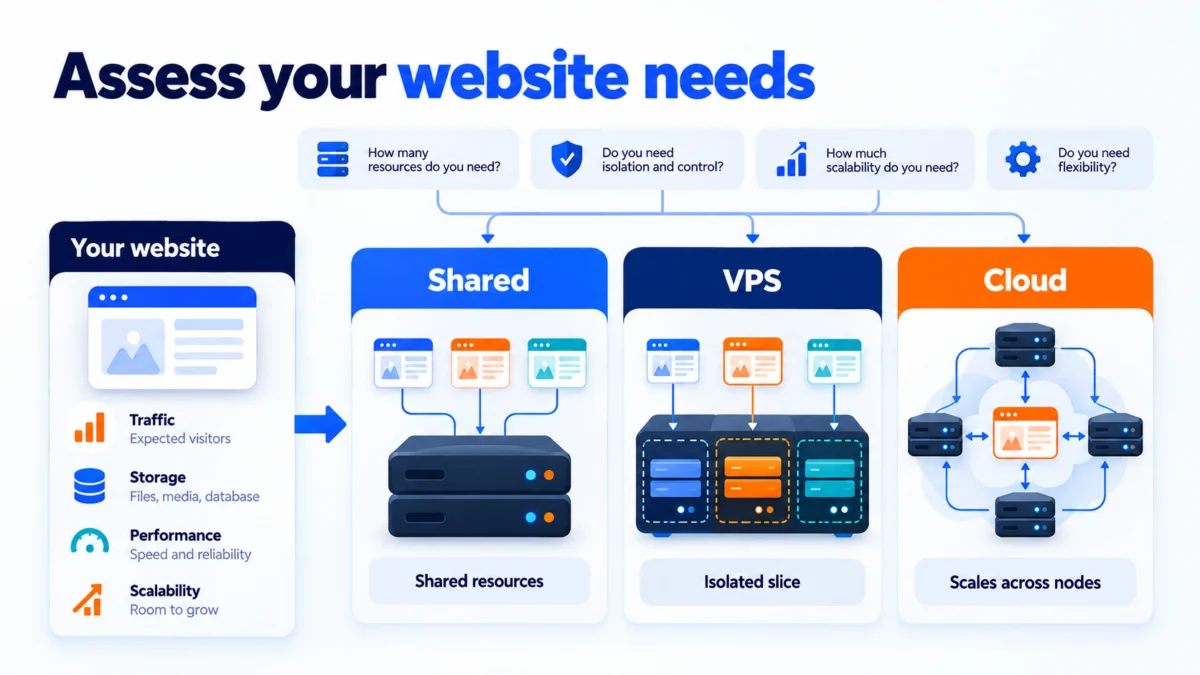
Before comparing providers, you must define the operational workload your website requires to run smoothly. Server configurations, hardware limits, and software stacks vary widely between plans. Choosing the wrong tier results in either overpaying for idle capacity or suffering frequent site slowdowns under modest traffic.
Traffic expectations
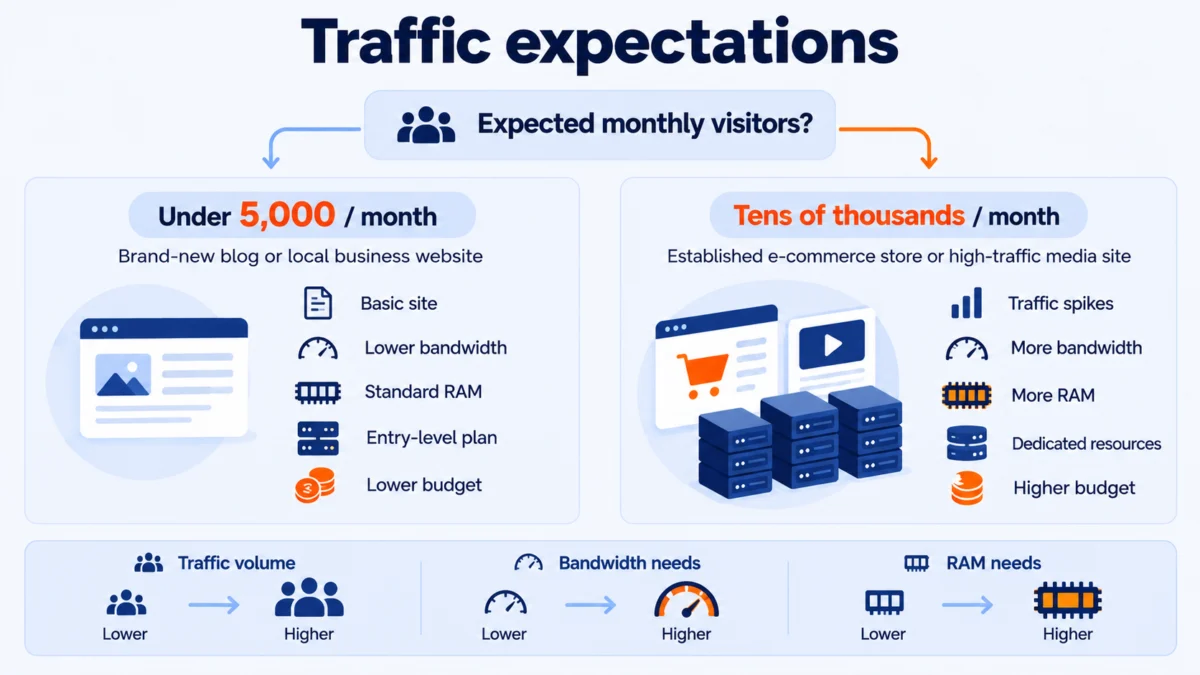
Your anticipated monthly visitors dictate the necessary server memory (RAM), compute power (CPU cores), and bandwidth throughput. A brand-new blog, personal portfolio, or local business site receiving fewer than 5,000 visitors per month runs comfortably on entry-level infrastructure. Conversely, an e-commerce storefront or media portal with tens of thousands of monthly visitors requires dedicated memory allocations and server-level caching to prevent sluggish page rendering or database timeouts during traffic spikes.
Platform and software requirements
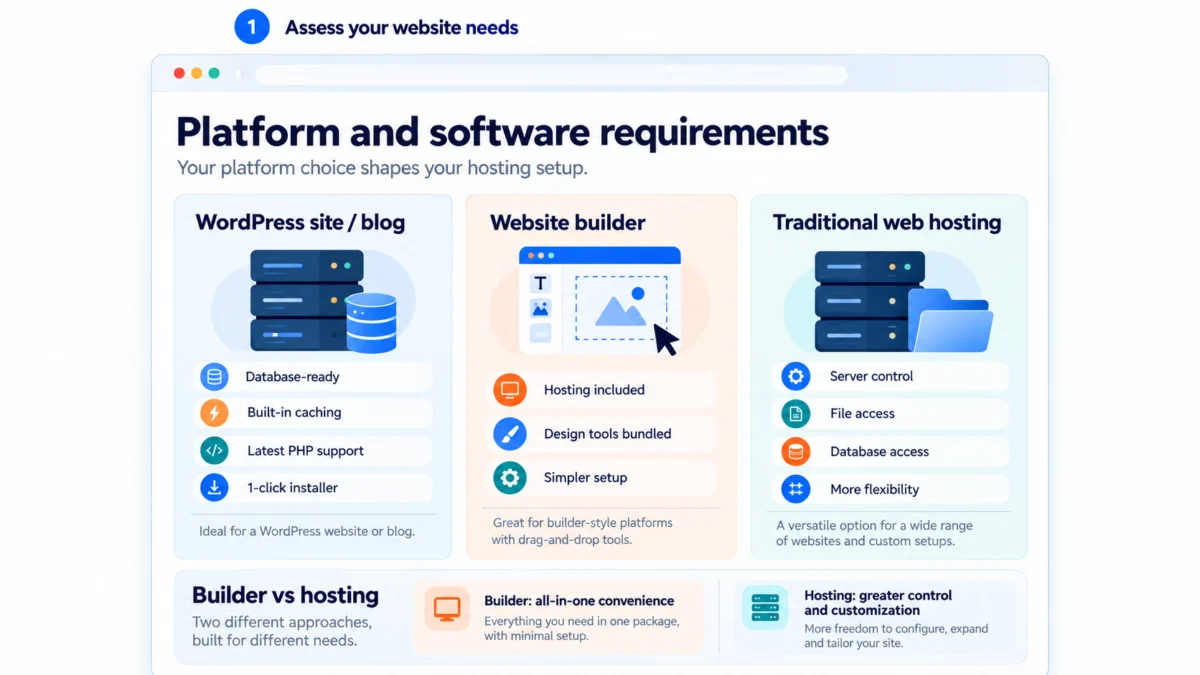
The content management system (CMS) or framework you choose dictates server prerequisites. For WordPress installations, verify that your server satisfies the official WordPress.org hosting requirements, which recommend PHP 7.4 or higher (ideally PHP 8.2 or later), MySQL 8.0 or MariaDB 10.5+, and HTTPS support. Readers starting a new site can review our step-by-step tutorial on how to start a WordPress blog or follow our walkthrough on how to create a WordPress website to configure their installation with automated installers.
If you have not settled on a CMS, comparing a website builder vs. web hosting clarifies the architectural trade-offs: proprietary website builders (such as Squarespace or Wix) bundle hosting and design tooling into a closed ecosystem, whereas standalone web hosting provides unrestricted access to your files, database, and server configuration.
2. Understand the main hosting types
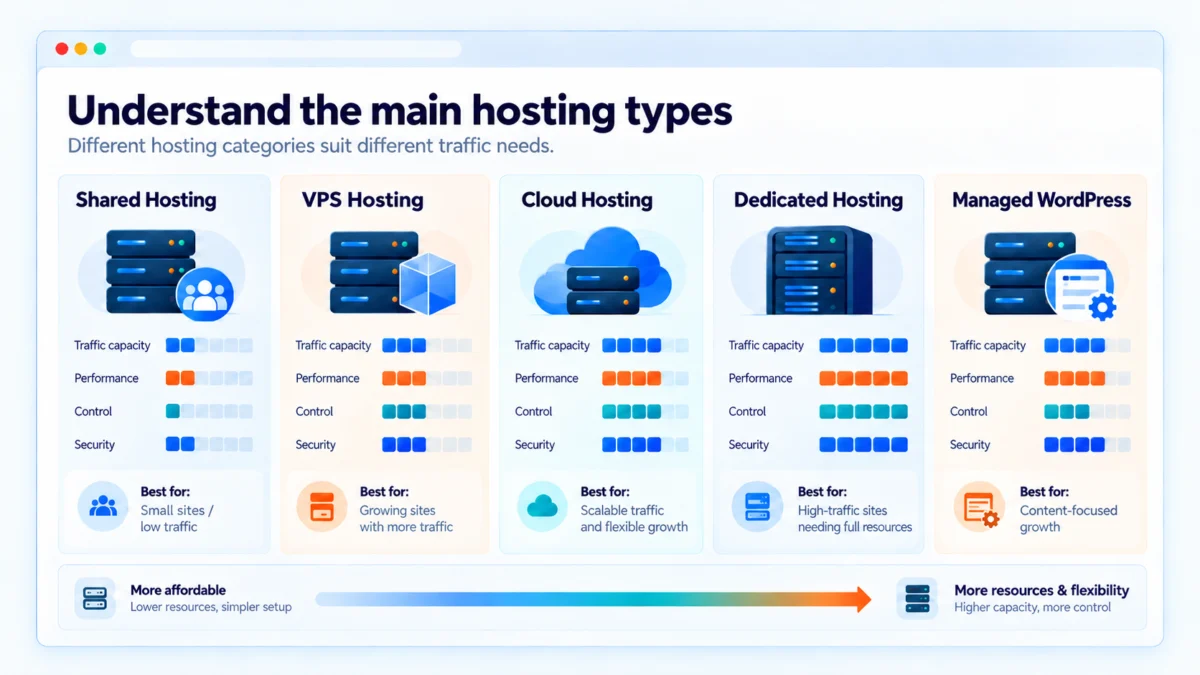
Hosting plans are categorized by how server hardware and virtualization are configured. Understanding how to choose web hosting across these distinct tiers ensures you do not overspend on unneeded server administration or bottleneck your site on underpowered hardware.
Shared hosting
In a shared hosting environment, hundreds of independent websites reside on a single physical machine, sharing a pooled pool of CPU, RAM, and storage. Shared plans represent the most economical entry point, making them practical for beginners and low-traffic informational sites. The primary compromise is resource contention: if a neighboring account on the same physical box experiences an unexpected traffic surge, your site may experience temporary latency.
Virtual private server (VPS) hosting
VPS hosting uses a hypervisor to partition a physical machine into isolated virtual servers. While physical hardware is still shared across multiple tenants, each account receives guaranteed compute slices (CPU cores and RAM) that neighboring accounts cannot exhaust. VPS environments provide root access, customizable firewall rules, and scalable operating environments, making them suitable for growing companies and technical developers.
Cloud hosting
Rather than confining your website to a single hardware unit, cloud hosting distributes containerized server environments across a networked cluster of physical machines. If one node encounters a hardware fault, another instance instantly assumes the workload, maintaining high availability. Cloud architecture allows near-instantaneous vertical scaling of RAM and bandwidth during promotional campaigns, frequently billed on a flexible pay-as-you-grow basis.
Managed WordPress hosting
Managed hosting delivers an optimized application layer specifically engineered for WordPress. Server configurations incorporate LiteSpeed or Nginx reverse proxies, server-side object caching (such as Redis or Memcached), automatic core and plugin updates, isolated staging environments, and daily automated snapshots. While priced higher than standard shared plans, evaluating the best managed WordPress hosting options is worthwhile for businesses seeking to delegate server maintenance entirely.
3. Key performance and reliability metrics
Evaluating server infrastructure requires looking at contractual service level agreements (SLAs) and verifiable performance telemetry rather than vendor advertising. When assessing how to choose web hosting for long-term stability, three metrics matter most.
Uptime guarantees
Uptime indicates the proportion of time a server remains reachable and operational. Reliable hosts offer an uptime SLA of 99.9% or higher. Mathematically, a 99.9% uptime rate permits approximately 43 minutes of unscheduled downtime each month, while a 99.99% tier reduces permissible downtime to just over 4 minutes per month. Always review the host’s contractual terms of service to verify what financial credits or remedies apply if service falls below their guaranteed threshold.
Server response time (TTFB)
Time to First Byte (TTFB) records the duration between a browser’s initial HTTP request and receipt of the first byte of data from the origin server. According to performance guidelines from Google’s web.dev team on TTFB, server response times under 200ms provide an optimal foundation for passing Core Web Vitals. To achieve low response times, prioritize providers utilizing high-speed NVMe storage drives, HTTP/3 network protocols, and server-side object caching engines.
Datacenter locations
Latency is governed by physical distance. Selecting a provider with datacenter facilities situated near your primary target audience minimizes network hops and packet travel times. For predominantly North American traffic, host your site in a US or Canadian facility. For international traffic distributions, ensure your hosting setup integrates with a Content Delivery Network (CDN) such as Cloudflare to serve cached static assets from distributed edge nodes worldwide.
4. The commercial reality: renewal rates and hidden costs
Evaluating hosting plans requires dissecting promotional pricing structures. Many web hosts advertise deep promotional discounts that apply only to long initial billing cycles, followed by steep price jumps at contract renewal.
Introductory promotional rates frequently require a 12-month, 36-month, or 48-month advance commitment. Once that initial period concludes, accounts renew at standard rack rates that are two to four times higher. For example, a plan billed at $2.99 per month during year one may jump to $17.99 per month for years two and three, drastically altering your ongoing website overhead.
Additionally, evaluate which core utilities are bundled into the base subscription versus sold as premium add-ons. Some providers charge extra for essential features like automated backups, domain privacy, professional email mailboxes, SSL renewals, or site migration. In our in-depth Hostinger review, we break down these renewal structures so readers understand their exact checkout totals. You can also model long-term commitments across different renewal tiers using our web hosting cost calculator.
| Provider and plan | Introductory rate | Initial term | Standard renewal rate | 3-year total cost | Key inclusions |
|---|---|---|---|---|---|
| Hostinger Premium | $2.99/mo | 12 months ($35.88 upfront) | $7.99/mo | $227.64 | Free SSL, free domain (1 yr), weekly backups, 100 websites |
| DreamHost Shared Starter | $2.59/mo | 36 months ($93.24 upfront) | $5.99/mo | $93.24 | Free SSL, free domain (1 yr), daily backups, 1 website |
| SiteGround StartUp | $2.99/mo | 12 months ($35.88 upfront) | $17.99/mo | $467.64 | Free SSL, daily backups, out-of-the-box caching, 1 website |
Note: Pricing data verified as of September 2026. Introductory rates apply to the initial billing term (36-month commitment for DreamHost, 12-month commitment for Hostinger and SiteGround). Three-year total cost includes the introductory term plus subsequent renewal periods through month 36. Always verify exact checkout totals on the provider’s official site before purchasing.
5. Step-by-step hosting selection matrix
This structured decision matrix simplifies how to choose web hosting by matching project specifications directly to recommended hosting tiers, realistic monthly budgets, and non-negotiable features:
| Your scenario | Recommended hosting type | Target monthly budget | Must-have features |
|---|---|---|---|
| Personal blog, portfolio, or local business site (<10k visits/mo) | Shared hosting | $2.50 – $5.00 | One-click WordPress install, free SSL, automated backups |
| Growing business, e-commerce store, or high-traffic blog (10k–50k visits/mo) | Managed WordPress or cloud hosting | $10.00 – $30.00 | Staging environment, server-level caching, dedicated resources |
| Web developer, agency, or custom application builder | VPS or managed cloud | $20.00 – $80.00 | Root access, dedicated IP, scalable RAM/CPU, choice of OS |
6. Final verdict: matching your profile to the right host
Selecting the right host ultimately balances your technical competence, project roadmap, and multi-year budget. When determining how to choose web hosting for your website, follow these guidelines:
- Choose shared hosting if you are launching your first website on a modest budget and anticipate steady, low traffic. Providers such as DreamHost and Hostinger deliver affordable entry points with free SSL certificates and included domain registration.
- Choose managed WordPress hosting if you run a mission-critical business site on WordPress and prefer to focus on content, conversions, and marketing while leaving server security, caching configurations, and automated updates to technical specialists.
- Choose cloud or VPS hosting if you operate an e-commerce platform, anticipate unpredictable traffic surges, or build custom applications requiring root shell access, dedicated IP addresses, and scalable system resources.
Before completing your purchase, consult our independent rankings of the best web hosting providers to evaluate side-by-side performance benchmarks, server response testing, and customer support response times.
Disclaimer: HostChoices is an independent, reader-supported review publication. When you purchase hosting through links on our site, we may earn an affiliate commission at no additional cost to you. This commercial relationship does not influence our editorial ratings, performance testing, or provider rankings.