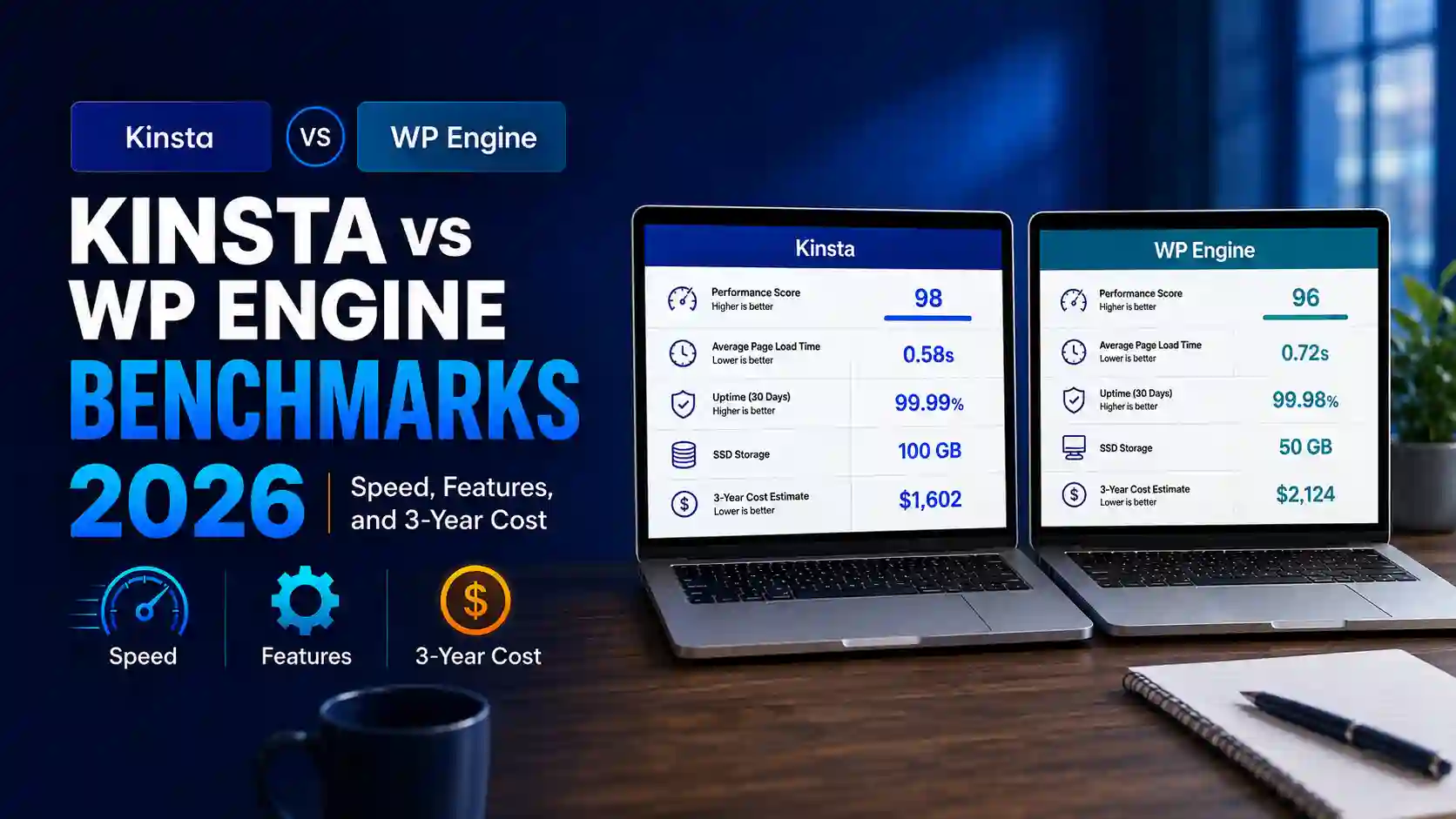
Kinsta vs WP Engine Benchmarks (2026): Speed, Features, and 3-Year Cost
Updated and fact-checked: July 30, 2026
| Quick verdict Kinsta is the stronger default for most single-site buyers because its annual entry plan costs less over three years, includes a 35,000-visit allowance, charges much lower visit overages, and bundles expert migrations, application performance monitoring, and advanced edge security. WP Engine wins the latest transparent matched performance window: 355 ms US median TTFB versus 525 ms for Kinsta, with 100.00% monitored uptime versus 99.98%. Choose WP Engine when that synthetic response-time edge, a longer backup history, and its production/staging/development workflow outweigh the higher long-term cost and lower entry-plan traffic allowance. |
This Kinsta vs WP Engine benchmarks comparison uses current official US plan terms and the newest same-publisher, same-window independent monitoring we could verify. It does not claim that HostChoices opened accounts or ran these measurements. See how HostChoices tests web hosting for the distinction between official facts, independent measurements, and firsthand tests.
Kinsta vs WP Engine at a glance
The fairest entry-level comparison is Kinsta’s Single 35k annual plan against WP Engine’s Startup annual plan. They are not identical products: Kinsta allows more monthly visits and includes more security and diagnostic tooling, while WP Engine provides a broader three-environment workflow and a longer restore-point history. The benchmark evidence is directionally useful because the same independent publisher monitored both services over the same date window, but the tests used separate sites and legacy plan labels rather than a laboratory-controlled clone.
| Decision | Winner | Why | Confidence |
| Best overall entry-plan value | Kinsta | $150 lower modeled 3-year cost, more visits, lower overage, stronger included tooling | High |
| Latest matched synthetic performance | WP Engine | 355 ms US median TTFB and 100.00% monitored uptime | Moderate |
| Backup history and workflow | WP Engine | Up to 40 days of restore points and production/staging/development environments | High |
| Security and diagnostics included | Kinsta | Cloudflare WAF/DDoS, malware removal, and Kinsta APM are included | High |
Comparison scope and evidence parity
- Commercial facts: official pricing, plan, billing, renewal, overage, SLA, refund, backup, migration, support, and security documentation checked July 30, 2026.
- Performance facts: HostingStep’s Kinsta and WP Engine review pages, updated July 22 and July 25, 2026, covering the same October 1, 2025-May 31, 2026 monitoring window.
- No current-week matched benchmark was found. The performance category therefore carries moderate confidence and should not be treated as a guarantee for a specific WordPress stack.
- Taxes, optional add-ons, regional charges, and future price changes are excluded from the three-year model.
- Visit-counting rules are not perfectly identical, so overage scenarios are decision aids rather than exact cross-provider billing simulations.
Pricing: Kinsta is cheaper over three years
Kinsta’s current US pricing page lists Single 35k at $35 month-to-month or $350 billed annually, with one WordPress site, 35,000 monthly visits, 10 GB of storage, and 125 GB of CDN traffic. The annual total is the equivalent of two free months compared with twelve monthly payments.
WP Engine’s Startup plan page shows a first-year annual rate starting at $30 per month, or $360 for twelve months, for one site, 25,000 monthly visits, 10 GB of storage, and 75 GB of bandwidth. WP Engine’s 2026 renewal notice sets the Startup monthly renewal price at $35 for renewals on or after March 11, 2026, making the modeled annual renewal $420.
| Plan | Year 1 | Year 2 | Year 3 | 3-year total |
| Kinsta Single 35k annual | $350 | $350 | $350 | $1,050 |
| WP Engine Startup annual | $360 | $420 | $420 | $1,200 |
| Kinsta advantage | $10 | $70 | $70 | $150 (12.5%) |
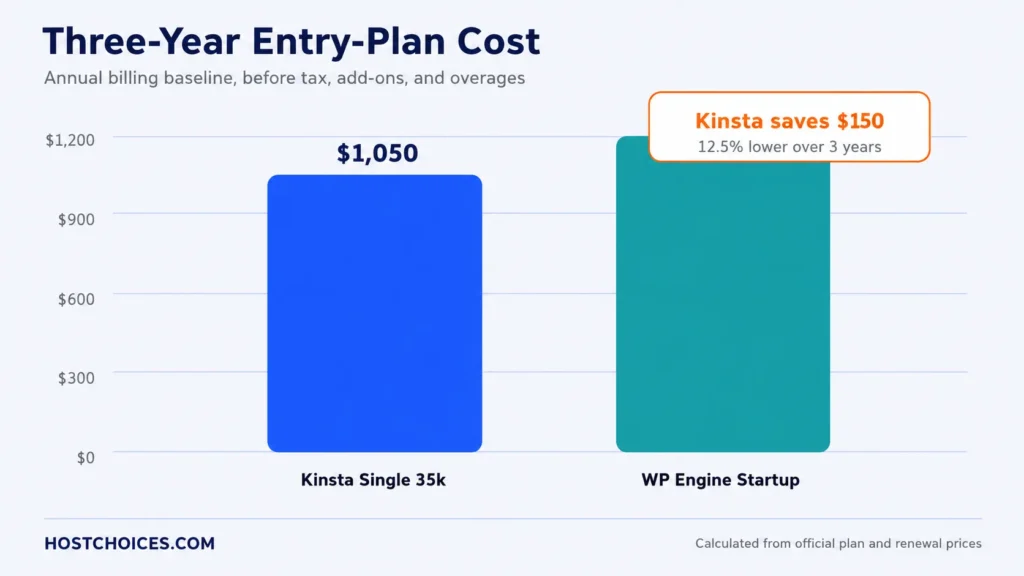
| Cost formula Kinsta: $350 × 3 = $1,050. WP Engine: $360 + ($420 × 2) = $1,200. Kinsta’s $150 advantage equals 12.5% of WP Engine’s modeled three-year total. |
What happens when traffic exceeds the plan
Kinsta’s official overage schedule charges $0.50 per 1,000 visits above the plan allowance. WP Engine’s visit-counting documentation lists $2 per 1,000 visits over the plan limit. At 40,000 counted visits in a month, the directional overage scenario is $2.50 for Kinsta versus $30 for WP Engine.
That gap matters for sites with occasional campaign spikes. It does not mean Kinsta will always bill fewer visits: the providers define and count traffic through their own systems, and those methods can change the final bill.
Performance benchmarks: WP Engine leads this window
The newest comparable evidence we found came from HostingStep’s Kinsta monitoring page and WP Engine monitoring page. Both pages report the same October 1, 2025-May 31, 2026 window and the same publisher’s monitoring framework. WP Engine recorded a 355 ms US median time to first byte (TTFB) and 100.00% uptime; Kinsta recorded 525 ms and 99.98%. Both reported a 0% error rate in the cited load test, with WP Engine at 27 ms and Kinsta at 40 ms.
| Metric | Kinsta | WP Engine | Winner | Window | Evidence status |
| US median TTFB | 525 ms | 355 ms | WP Engine | Oct. 1, 2025-May 31, 2026 | Comparable independent |
| Monitored uptime | 99.98% | 100.00% | WP Engine | Same window | Comparable independent |
| Load-test response | 40 ms | 27 ms | WP Engine | Publisher test | Comparable independent |
| Load-test errors | 0% | 0% | Tie | Publisher test | Comparable independent |
| WPBench score | 8.8 | 6.5 | Kinsta | Publisher test | Comparable independent |
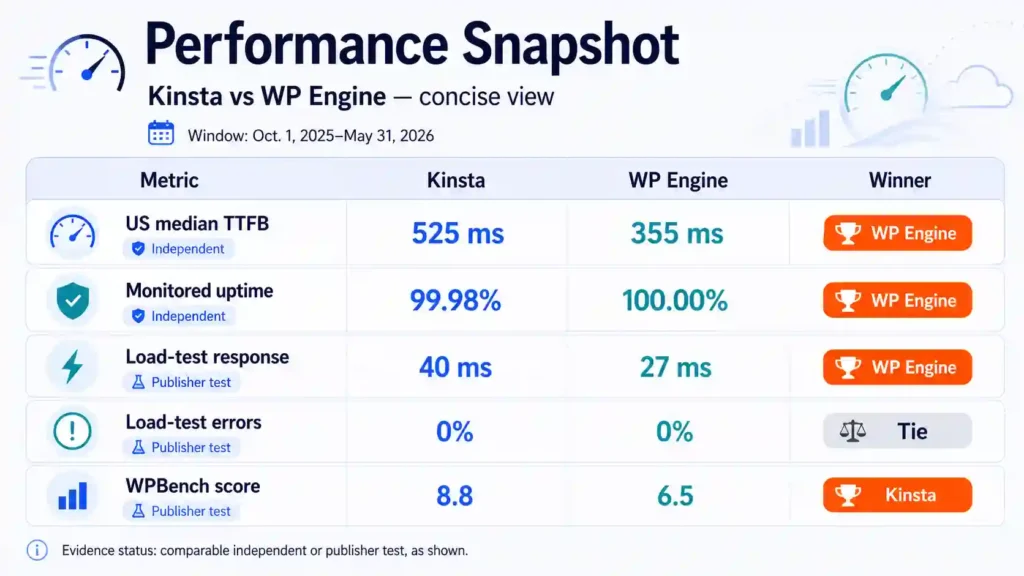
Figure 2. Latest comparable transparent monitoring found; separate synthetic sites, not a HostChoices firsthand test.
The result supports a performance-category win for WP Engine, not a universal speed guarantee. TTFB is only one layer of page experience; theme weight, database behavior, plugins, caching, geography, and logged-in traffic can reverse the result. Kinsta’s higher WPBench score also suggests that a single synthetic response metric does not capture every workload.
Limits, backups, SLA, and support
| Factor | Kinsta Single 35k | WP Engine Startup | Practical effect |
| Sites | 1 | 1 | Directly comparable |
| Monthly visits | 35,000 | 25,000 | Kinsta gives 40% more headroom |
| Storage | 10 GB | 10 GB | Tie |
| CDN/bandwidth | 125 GB CDN | 75 GB bandwidth | Labels differ; Kinsta lists more |
| Backup history | Daily, 14-day retention | Daily/on-demand, up to 40 days | WP Engine is stronger for older restores |
| Staging/workflow | One free staging environment | Production, staging, and development | WP Engine is stronger for team workflows |
| Entry-plan support | 24/7 chat; no phone | 24/7 chat; phone starts above Startup | Neither entry plan includes phone |
| Uptime SLA | Up to 99.9% on standard plans | 99.95% service availability | WP Engine’s legal baseline is higher |
| Money-back window | 30 days after any free period | 60 days for eligible new shared plans | WP Engine gives more evaluation time |
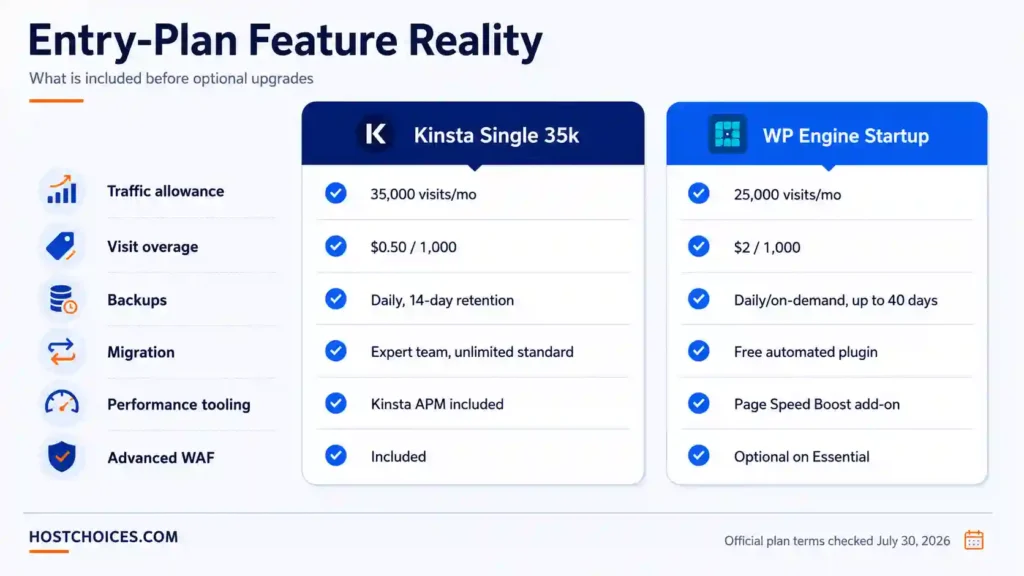
Backups and restore options
Kinsta documents daily backups with 14-day retention on the entry plan, plus manual backup slots. WP Engine’s plan materials provide daily and on-demand backups with restore points available for up to 40 days. WP Engine therefore gives a larger native recovery window, while Kinsta’s entry plan is adequate for routine short-term rollback.
SLA and cancellation details
Kinsta’s standard uptime commitment is up to 99.9% on qualifying standard plans. WP Engine’s legal SLA defines 99.95% service availability, subject to excused downtime and the claim terms. Premium 99.99% figures on either provider’s higher tiers should not be attributed to these entry plans.
Kinsta’s money-back documentation provides a 30-day guarantee after any applicable free period. WP Engine advertises a 60-day guarantee for eligible new shared-hosting customers, but its cancellation process requires notice through the account workflow. Read the current terms before purchase because refunds, credits, and notice requirements are different remedies.
Security and performance tooling: Kinsta includes more
Kinsta’s entry plan bundles Cloudflare-backed edge protection, a web application firewall, DDoS mitigation, free malware removal, and its application performance monitoring tool. These inclusions reduce the chance that a small business must buy a separate diagnostic or advanced edge-security layer immediately.
The included Kinsta APM documentation confirms that the tool is available on all plans. WP Engine includes platform-level security, SSL, caching, and core DDoS protection, but its plan table presents advanced managed WAF and Page Speed Boost as optional add-ons on Essential plans. Its security documentation and malware-cleaning guidance describe the broader managed-security process.
Dashboard, staging, and migration workflow
Kinsta’s differentiator is service-led migration. Its migration policy includes unlimited free migrations for standard WordPress installations handled by the migration team. The entry plan also includes one staging environment for each installation.
WP Engine’s differentiator is workflow structure. Its environment model separates production, staging, and development, while the User Portal centralizes backups, cache controls, domain settings, and deployment tasks. Migration is normally performed through WP Engine’s free automated migration plugin, which is convenient for standard sites but less service-led than Kinsta’s expert migration.
Kinsta: where it wins and where it falls short
Why Kinsta ranks first overall
- Lower modeled three-year entry-plan cost: $1,050 versus $1,200.
- 35,000 monthly visits instead of 25,000, plus a much lower published visit overage rate.
- Expert migration service rather than a primarily plugin-led process.
- Included APM, advanced WAF/DDoS protection, and malware removal.
- Strong WPBench score in the same independent review set.
Kinsta limitations
- Slower US median TTFB in the latest matched independent monitoring window.
- Fourteen-day entry-plan backup retention is shorter than WP Engine’s up-to-40-day history.
- Support is chat-based; Kinsta does not position phone support as an entry-plan channel.
- The standard entry-plan SLA is lower than WP Engine’s 99.95% legal baseline.
Best fit: A business, publisher, or store with one WordPress site that values transparent long-term cost, more traffic headroom, included security/diagnostic tools, and expert migration help.
WP Engine: where it wins and where it falls short
Why WP Engine may be the better choice
- Faster TTFB and perfect monitored uptime in the latest comparable independent window.
- Up to 40 days of backup restore points.
- Production, staging, and development environments suit agency and team workflows.
- A 99.95% entry-service SLA and a longer eligible money-back window.
- A mature managed WordPress ecosystem with portal-based deployment and troubleshooting tools.
WP Engine limitations
- Higher modeled three-year cost after the 2026 Startup renewal price.
- Lower 25,000-visit allowance and a substantially higher published visit overage rate.
- Phone support is not included on Startup.
- Advanced managed WAF and Page Speed Boost are optional rather than entry-plan inclusions.
- The free migration path is primarily automated; complex sites may require more planning.
Best fit: An agency, development team, or performance-sensitive site owner who values a structured three-environment workflow, longer restore history, and the strongest result in the cited independent monitoring window.
Choose Kinsta or WP Engine?
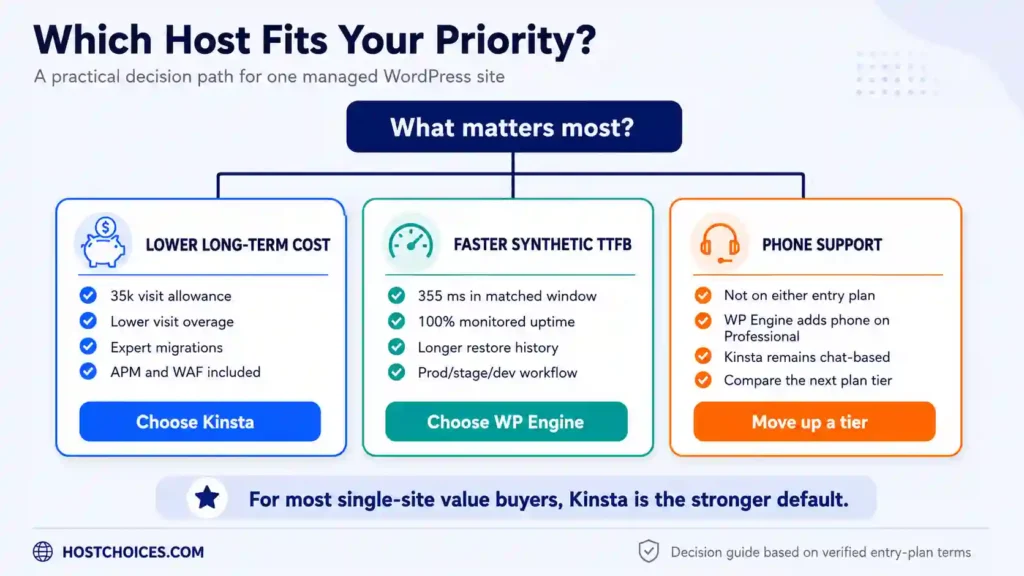
| Choose Kinsta when… | Choose WP Engine when… | Move above entry level when… |
| Long-term cost and visit headroom matter most | Synthetic TTFB is the priority | You require phone support |
| You want expert migration help | You need prod/stage/dev environments | You need isolated resources |
| You want APM and advanced WAF included | You need a longer restore history | You require a premium 99.99% SLA |
| Traffic may spike above 25,000 visits | The $150 three-year premium is acceptable | Your stack needs dedicated capacity |
For a broader three-provider view, compare Kinsta vs WP Engine vs Cloudways. To model a different billing horizon or add-on mix, use the HostChoices long-term hosting cost calculator.
Final verdict
| Overall winner: Kinsta Kinsta wins the overall entry-plan decision for most one-site buyers. The recommendation is driven by the lower three-year cost, larger visit allowance, lower published overage rate, expert migrations, and included performance/security tooling—not by affiliate availability. WP Engine remains the better situational choice for buyers who place the highest value on the faster independent TTFB result, longer backup history, and production/staging/development workflow. |
Before buying, review Kinsta’s current plan terms and WP Engine’s current plan terms, then choose according to total cost and the operational constraint that matters most to your site.
Frequently asked questions
Is Kinsta cheaper than WP Engine?
On the entry plans compared here, yes. The modeled three-year baseline is $1,050 for Kinsta and $1,200 for WP Engine, assuming Kinsta remains $350 annually and WP Engine renews at $35 per month.
Is WP Engine faster than Kinsta?
In the latest matched transparent monitoring window we found, WP Engine had the lower US median TTFB: 355 ms versus 525 ms. That is a category result, not a guarantee for every WordPress site.
Which provider is better for high traffic?
Kinsta gives more entry-plan visit headroom and publishes a much lower per-1,000-visit overage rate. For sustained high traffic, compare higher tiers and resource isolation rather than relying only on visitor limits.
Which has better backups?
WP Engine has the stronger default restore history, with up to 40 days versus Kinsta’s 14-day entry-plan retention. Kinsta still provides daily and manual backups.
Does either entry plan include phone support?
No. Kinsta is chat-based, and WP Engine’s Startup plan is chat-only; phone support begins on higher WP Engine plans.
Are these HostChoices firsthand benchmarks?
No. The article uses official commercial documentation and transparent independent monitoring. Every performance result is labeled by provenance and date.
Methodology and source note
Commercial terms were checked against official US provider pages on July 30, 2026. The three-year model excludes tax, optional add-ons, overages, and future price changes. Performance values come from separate HostingStep review pages updated July 22 and July 25, 2026, using the same October 1, 2025-May 31, 2026 monitoring window. Because the sites were not a laboratory-controlled clone and no current-week matched study was available, the performance verdict is moderate-confidence.
Primary sources: Kinsta pricing; Kinsta overages; WP Engine plans; WP Engine renewal pricing; WP Engine visit overages. Independent monitoring: Kinsta and WP Engine.